SD-WAN Product Introduction
1 Product Roadmap
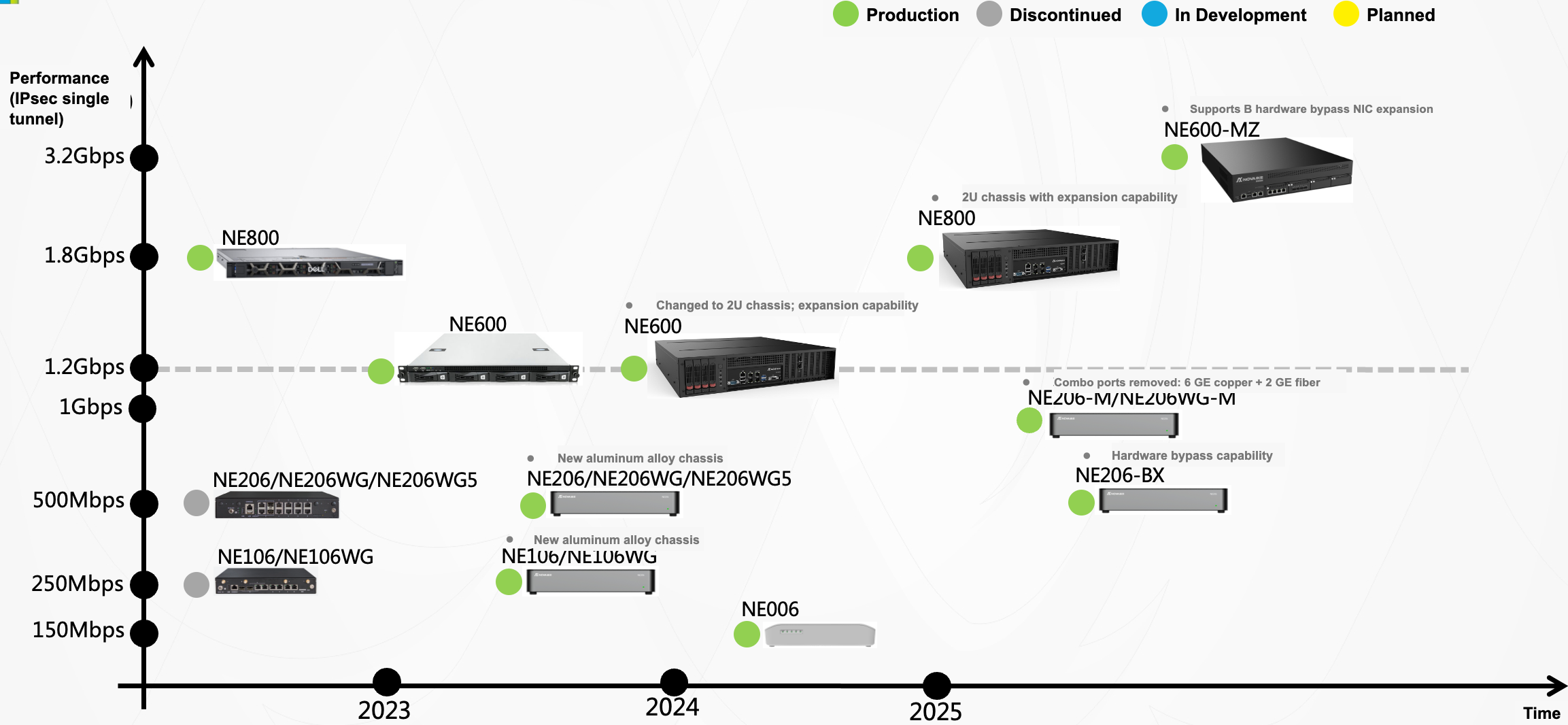
2 Comparison of Main Indicators by Model
| Equipment | Internet performance | IPsec performance single tunnel, 1300 bytes | Maximum number of tunnels | Maximum number of flows | Maximum number of routes | Maximum number of VRFs |
|---|---|---|---|---|---|---|
| NE006 | 1Gbps | 150Mbps | 128 | 128k | 50k | 2 |
| NE106 | 1Gbps | 250Mbps | 256 | 128k | 50k | 2 |
| NE106WG | 1Gbps | 250Mbps | 256 | 128k | 50k | 2 |
| NE206 | 1Gbps | 500Mbps | 512 | 256k/128k(swg) | 100k | 4 |
| NE206WG | 1Gbps | 500Mbps | 512 | 256k/128k(swg) | 100k | 4 |
| NE206-BX | 1Gbps | 500Mbps | 512 | 256k | 100k | 4 |
| NE206-M | 1Gbps | 830Mbps | 512 | 256k/128k(swg) | 100k | 4 |
| NE206WG-M | 1Gbps | 830Mbps | 512 | 256k/128k(swg) | 100k | 4 |
| NE600 | 10Gbps | 1.2Gbps | 2048 | 512k | 200k | 8 |
| NE600-MZ | 10Gbps | 3.2Gbps | 2048 | 512k | 200k | 8 |
| NE800 | 10Gbps | 1.8Gbps | 2048 | 1024k | 200k | 8 |
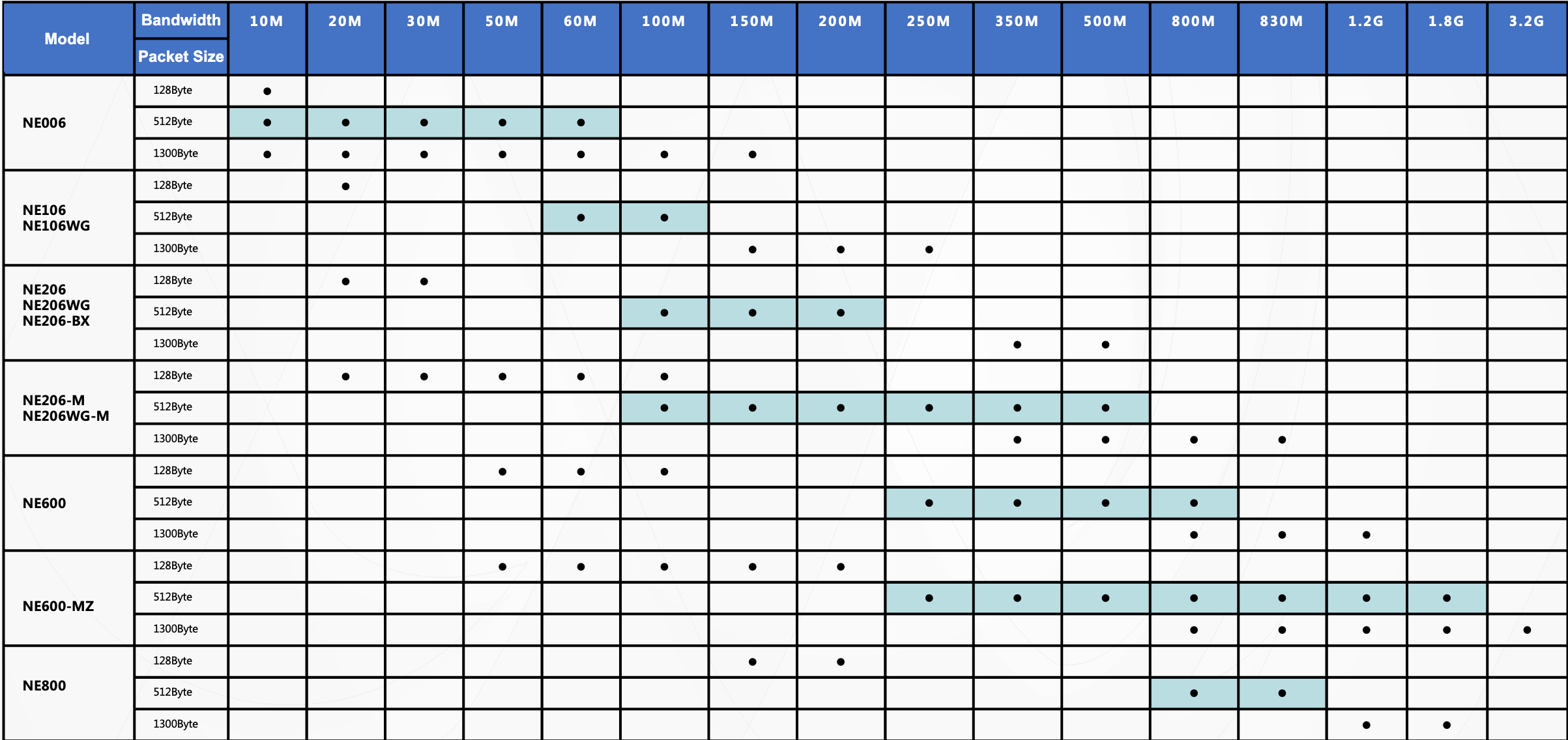
- Selection recommendations based on Spoke side IPSEC bandwidth (single tunnel)
3 NE006 Series
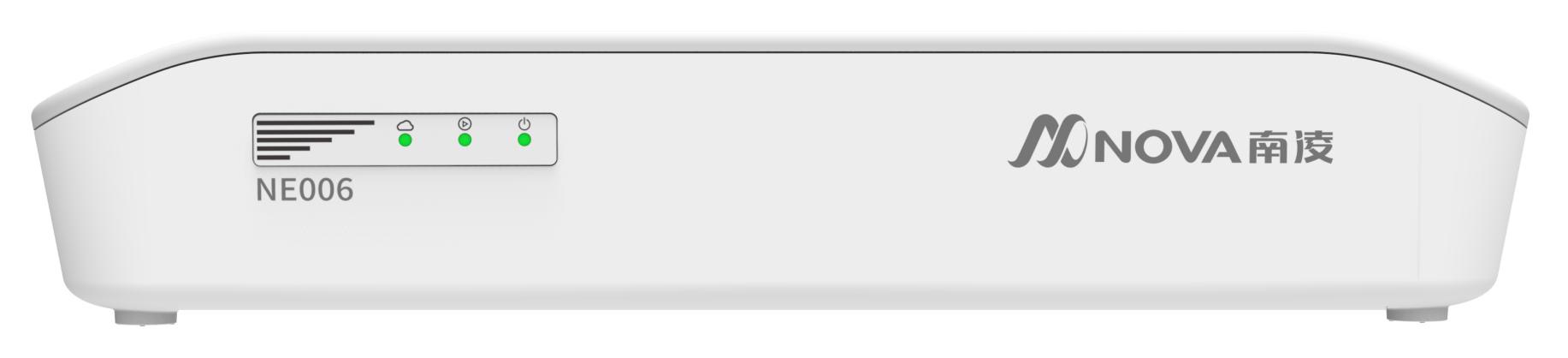
3.1 Product Features
- Low-power Arm quad-core processor
- Configure 4 GE network ports and 2 GE Combo network ports
- Desktop fanless silent design, simple and beautiful appearance
- Suitable for business scenarios such as customer branches and stores
3.2 Technical Indicators
| Project | Specifications | Notes |
|---|---|---|
| Product model | NE006 | |
| Hardware version | NE006-A | |
| Underlay access performance | 1Gbps | |
| Overlay single tunnel performance | 150Mbps | |
| Maximum number of tunnels | 128 | |
| Number of concurrent connections | 128k | |
| Maximum number of routes | 50k | |
| Maximum number of VRF | 2 | |
| Number of ports | 4*GE network port+2*GE Combo | |
| WAN+LAN | 2+4 | |
| USB port | 2*USB 3.0 | |
| 4G/5G | None | |
| WIFI | None | |
| CPU | Arm Cortex A53 Quad-Core Processor | |
| Memory | 2GB DDR4 | |
| Storage | 32GB | |
| Size (W*D*H) | 231*175*42mm | |
| Application scenario | Desktop type, plastic chassis | |
| Operating temperature | 0~45℃ |
3.3 I/O Front Panel Description
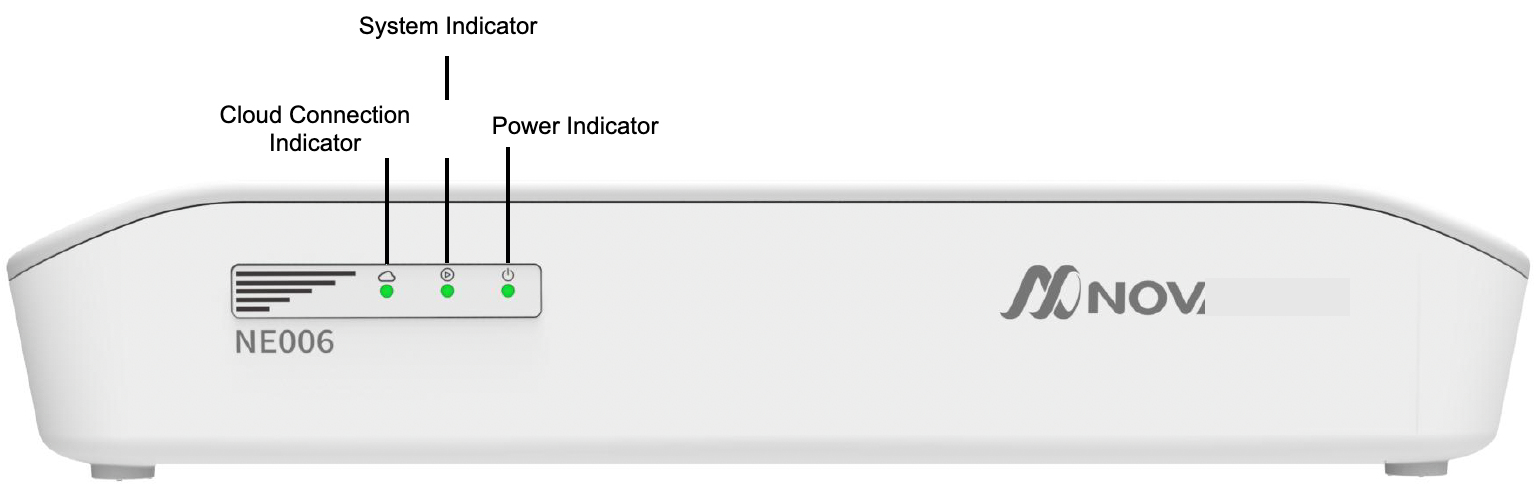
- Power indicator light: After the device is powered on, the power indicator light is always on
- System indicator light: After the system starts normally, the system indicator light is always on
- Cloud connection indicator: After the device is connected to the cloud controller normally, the cloud connection indicator is always on
3.4 I/O Rear Panel Description
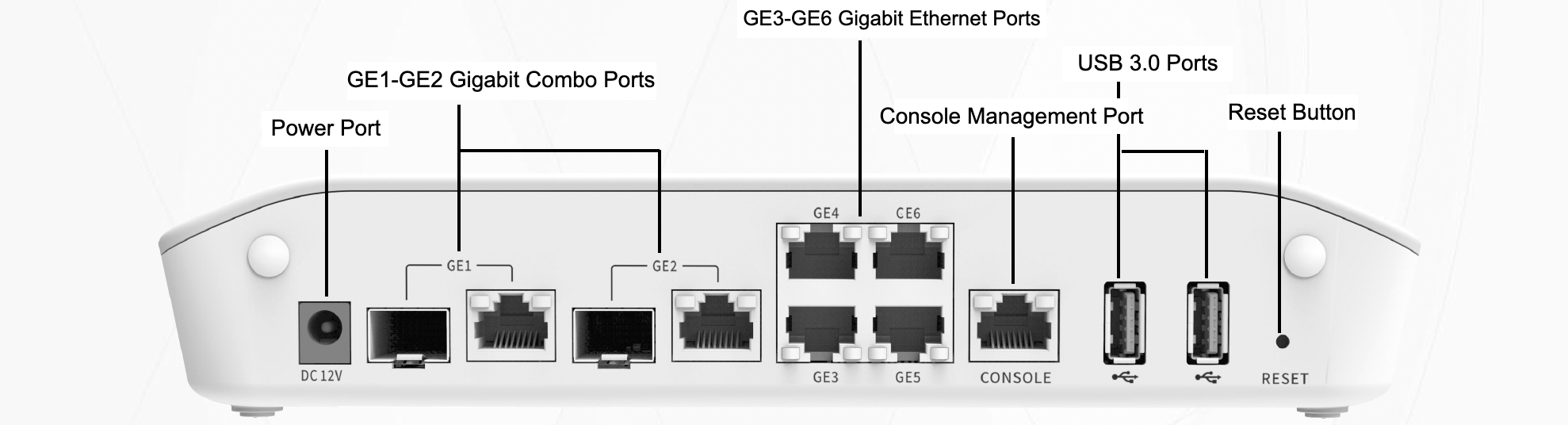
- GE1~GE2 Gigabit Combo ports, GE3~GE6 Gigabit electrical ports
- By default, GE1 and GE2 are WAN, and GE6 is the management port.
- Press and hold the reset button for 6 seconds and then release it to clear all configurations of the device.
4 NE106 Series
4.1 Product Features
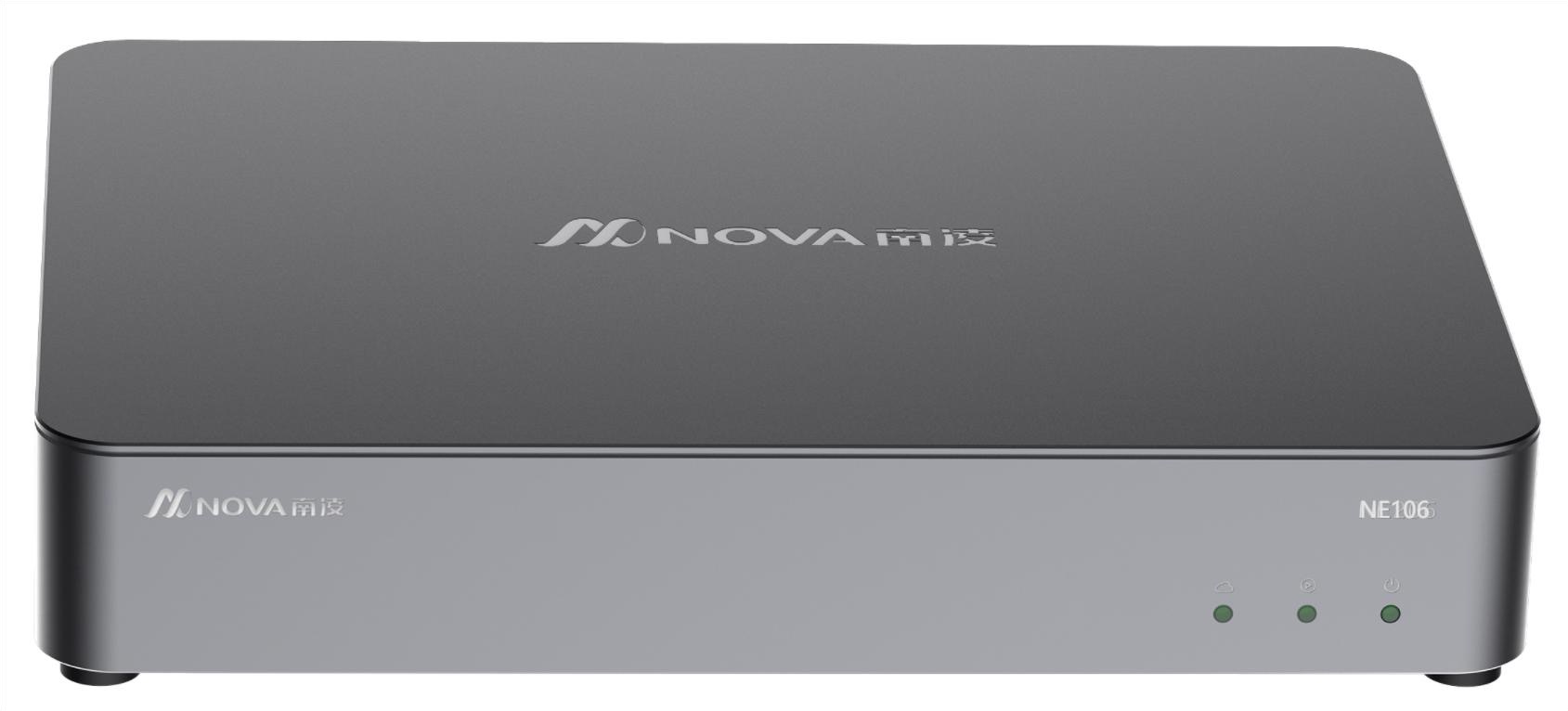
- Configure 4 GE network ports and 2 GE Combo network ports
- Multiple models available, supporting Wi-Fi and 4G LTE networks
- Aluminum alloy desktop casing supports optional trays for racking into the cabinet
- Suitable for business scenarios such as customer branches and stores
4.2 Technical Indicators
| Project | NE106 | NE106WG | Notes |
|---|---|---|---|
| Hardware version | NE106-X | NE106WG-X | |
| Underlay access performance | 1Gbps | 1Gbps | |
| Overlay single tunnel performance | 250Mbps | 250Mbps | |
| Maximum number of tunnels | 256 | 256 | |
| Number of concurrent connections | 128k | 128k | |
| Maximum number of routes | 50k | 50k | |
| Maximum VRF number | 2 | 2 | |
| Number of ports | 4*GE network port+2*GE Combo | 4*GE network port+2*GE Combo | |
| WAN+LAN | 2+4 | 2+4 | |
| USB port | 1*USB 2.0 | 1*USB 2.0 | |
| 4G/5G | None | 4G LTE | |
| WIFI | None | Support IEEE 802.11a/b/g/n/ac | |
| CPU | Intel X86 Dual Core | Intel X86 Dual Core | |
| Memory | 2GB DDR4 | 2GB DDR4 | |
| Storage | 32GB | 32GB | |
| Size (W*D*H) | 268*195*44.5mm | 268*195*44.5mm | |
| Application scenarios | Desktop type, aluminum alloy casing | Desktop type, aluminum alloy casing | |
| Operating temperature | 0~45℃ | 0~45℃ |
4.3 NE106 Front Panel Description
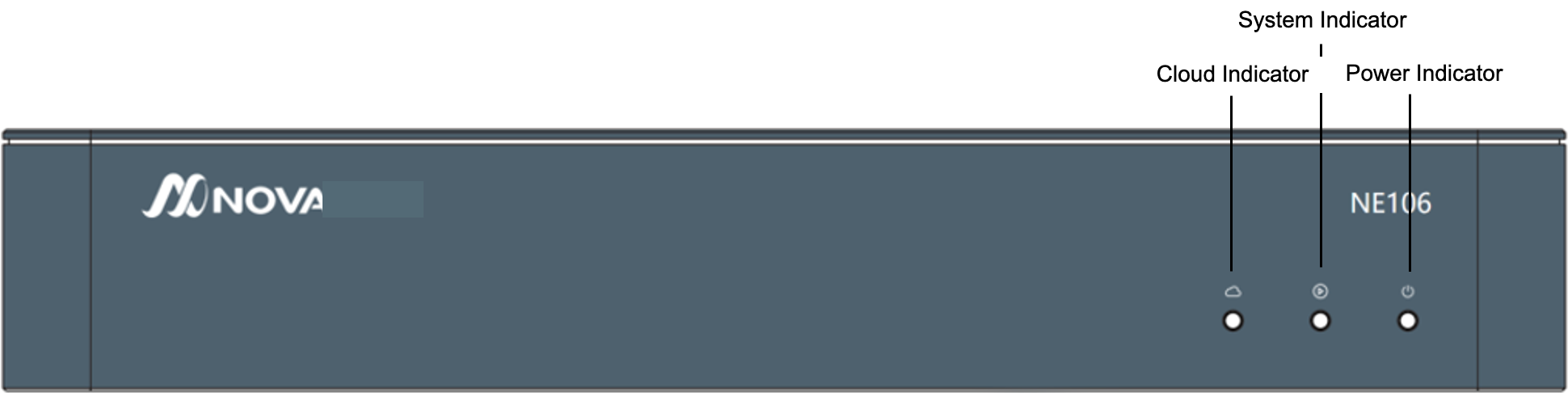
- Power indicator light: After the device is powered on, the power indicator light is always on
- System indicator light: After the system starts normally, the system indicator light is always on
- Cloud connection indicator: After the device is connected to the cloud controller normally, the cloud connection indicator is always on
4.4 NE106 Rear Panel Description
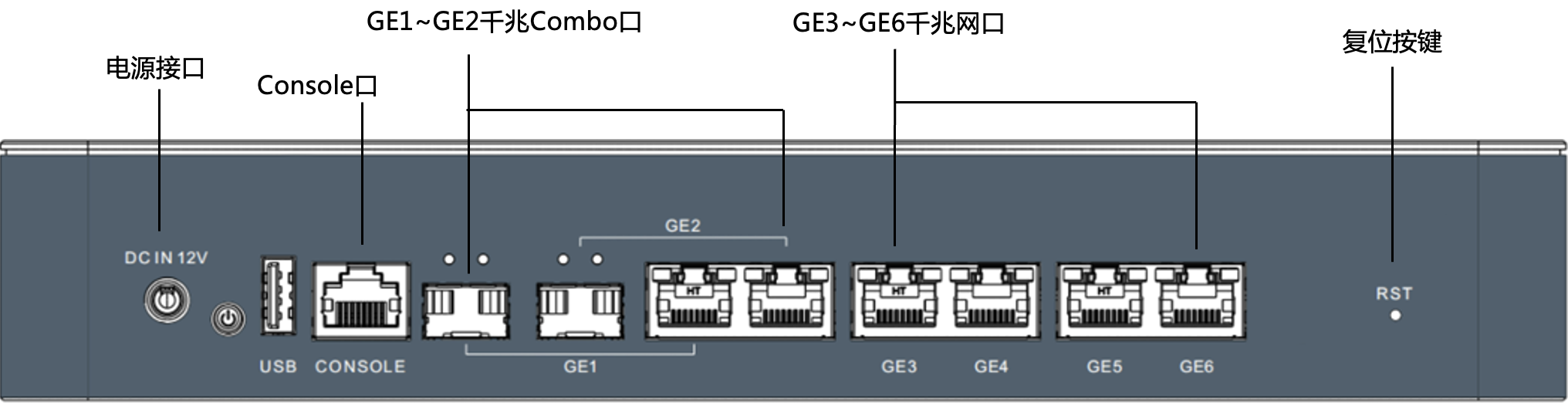
- GE1~GE2 Gigabit Combo ports, GE3~GE6 Gigabit electrical ports
- By default, GE1 and GE2 are WAN, and GE6 is the management port.
- Press and hold the reset button for 6 seconds and then release it to clear all configurations of the device.
4.5 NE106WG Front Panel Description
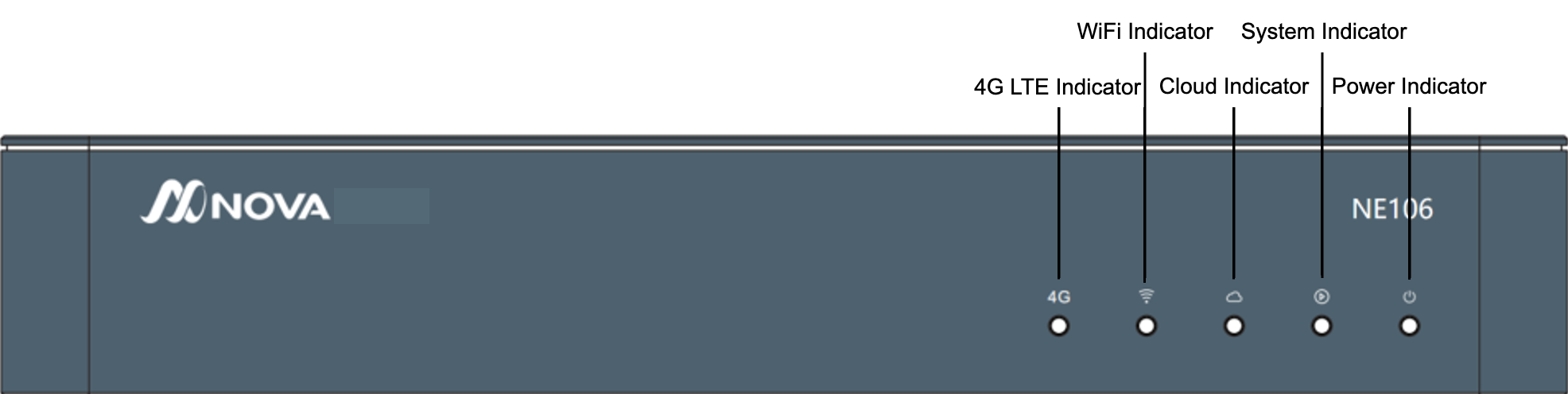
- Power indicator light: After the device is powered on, the power indicator light is always on
- System indicator light: After the system starts normally, the system indicator light is always on
- Cloud connection indicator: After the device is connected to the cloud controller normally, the cloud connection indicator is always on
- WiFi indicator light: When the light is on, it indicates that the device’s WiFi function is normal
- 4G LTE indicator light: When the light is on, it indicates that the device’s 4G LTE function is normal
4.6 NE106WG Rear Panel Description
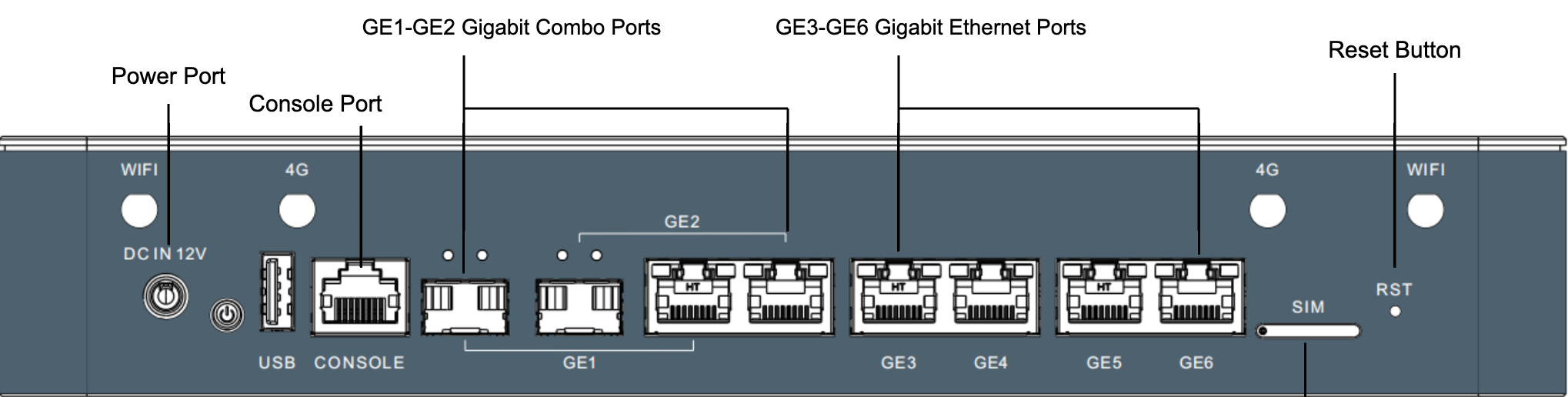
- GE1~GE2 Gigabit Combo ports, GE3~GE6 Gigabit electrical ports
- By default, GE1 and GE2 are WAN, and GE6 is the management port.
- Press and hold the reset button for 6 seconds and then release it to clear all configurations of the device.
5 NE206 Series
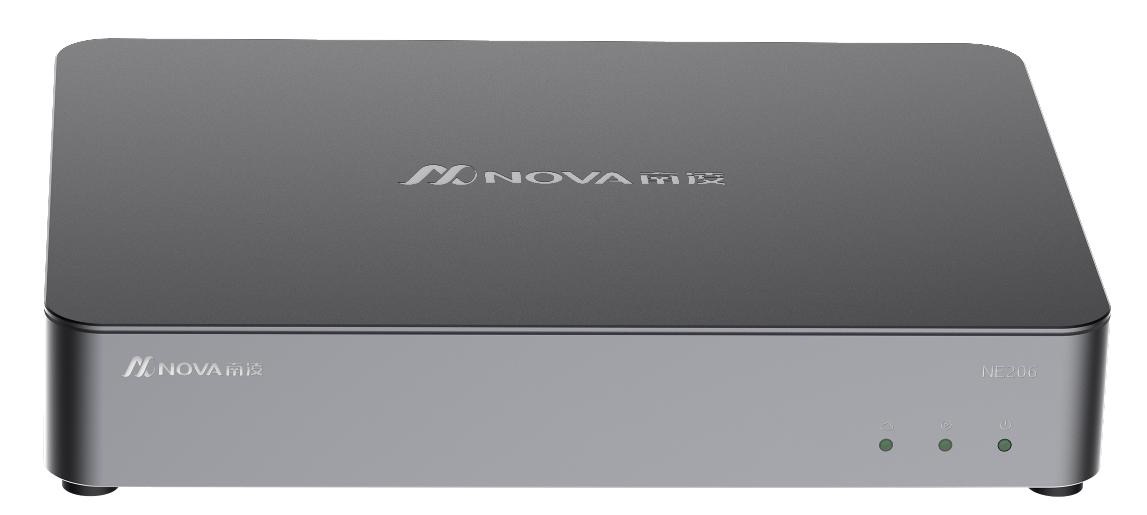
5.1 Product Features
- Configure 4 GE network ports and 2 GE Combo network ports
- Available in models with WiFi, 4G LTE, 5G NR and hardware bypass support
- Aluminum alloy desktop casing supports optional trays for racking into the cabinet
- Passed Enhanced Network Security Firewall Certification
- Suitable for business scenarios such as customer branches and stores
5.2 Technical Indicators
NE206/NE206WG/NE206WG5/NE206-BX
| Project | NE206 | NE206WG | NE206WG5 | NE206-BX | Notes |
|---|---|---|---|---|---|
| Hardware version | NE206-X, NE206-L | NE206WG-X, NE206WG-L | NE206WG5-X | NE206-BX | |
| Underlay access performance | 1Gbps | 1Gbps | 1Gbps | 1Gbps | |
| Overlay single tunnel performance | 500Mbps | 500Mbps | 500Mbps | 500Mbps | |
| Maximum number of tunnels | 512 | 512 | 512 | 512 | |
| Number of concurrent connections | 256k | 256k | 256k | 256k | |
| Maximum number of routes | 100k | 100k | 100k | 100k | |
| Maximum VRF number | 4 | 4 | 4 | 4 | |
| Number of ports | 4*GE network port+2*GE Combo | 4*GE network port+2*GE Combo | 4*GE network port+2*GE Combo | 4*GE network port+2*GE Combo | |
| Port hardware bypass | None | None | None | Bypass ports: GE1-GE2 | |
| WAN+LAN | 2+4 | 2+4 | 2+4 | 2+4 | |
| USB port | 2*USB 2.0 | 2*USB 2.0 | 2*USB 2.0 | 2*USB 2.0 | |
| 4G/5G | None | 4G LTE | 5G NR | None | |
| WIFI | None | Support IEEE 802.11a/b/g/n/ac | Support IEEE 802.11a/b/g/n/ac | Support IEEE 802.11a/b/g/n/ac | |
| CPU | Intel X86 4 core | Intel X86 4 core | Intel X86 4 core | Intel X86 4 core | |
| Memory | 8GB DDR4 | 8GB DDR4 | 8GB DDR4 | 8GB DDR4 | |
| Storage | 32GB/64GB | 32GB/64GB | 32GB/64GB | 32GB | |
| Size (W*D*H) | 268*195*44.5mm | 268*195*44.5mm | 268*195*44.5mm | 268*195*44.5mm | |
| Application scenario | Desktop type, aluminum alloy casing | Desktop type, aluminum alloy casing | Desktop type, aluminum alloy casing | Desktop type, aluminum alloy casing | |
| Operating temperature | 0~45℃ | 0~45℃ | 0~45℃ | 0~45℃ |
NE206-M/NE206WG-M
| Project | NE206-M | NE206WG-M | Notes |
|---|---|---|---|
| Hardware version | NE206-M | NE206WG-M | |
| Underlay access performance | 1Gbps | 1Gbps | |
| Overlay single tunnel performance | 830Mbps | 830Mbps | |
| Maximum number of tunnels | 512 | 512 | |
| Number of concurrent connections | 256k | 256k | |
| Maximum number of routes | 100k | 100k | |
| Maximum VRF number | 4 | 4 | |
| Number of ports | 6*GE electrical port + 2GE optical port | 6*GE electrical port + 2GE optical port | |
| Port Hardware Bypass | None | None | |
| WAN+LAN | 2+6 | 2+6 | |
| USB port | 2*USB 2.0 | 2*USB 2.0 | |
| 4G/5G | None | 4G LTE | |
| WIFI | None | Support IEEE 802.11a/b/g/n/ac | |
| CPU | Intel X86 4-core | Intel X86 4-core | |
| Memory | 8GB DDR4 | 8GB DDR4 | |
| Storage | 32GB | 32GB | |
| Size (W*D*H) | 268*195*44.5mm | 268*195*44.5mm | |
| Application scenarios | Desktop type, aluminum alloy casing | Desktop type, aluminum alloy casing | |
| Operating temperature | 0~45℃ | 0~45℃ |
5.3 NE206/NE206-M Front Panel Description
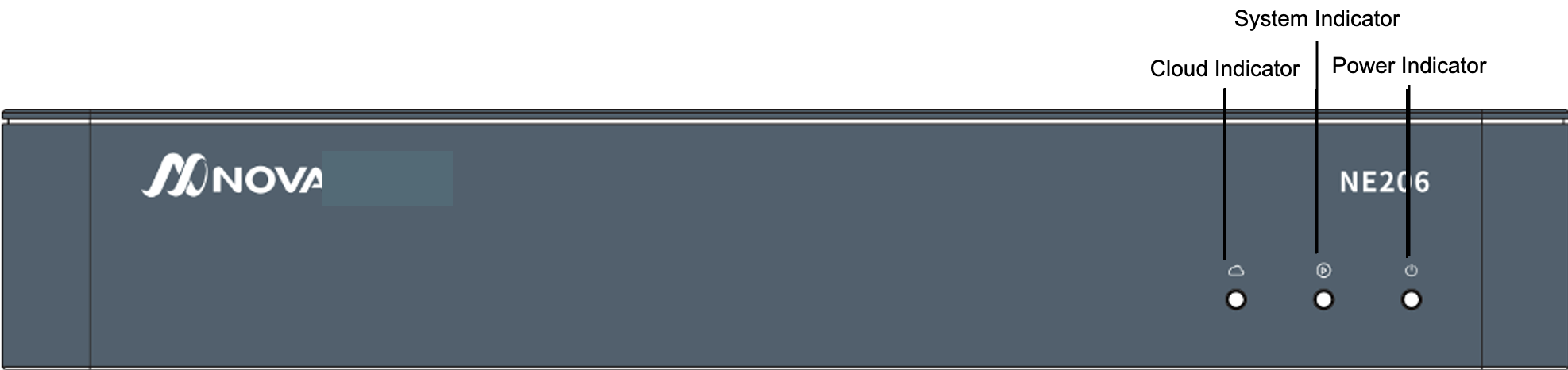
- Power indicator light: After the device is powered on, the power indicator light is always on
- System indicator light: After the system starts normally, the system indicator light is always on
- Cloud connection indicator: After the device is connected to the cloud controller normally, the cloud connection indicator is always on
5.4 NE206 Rear Panel Description
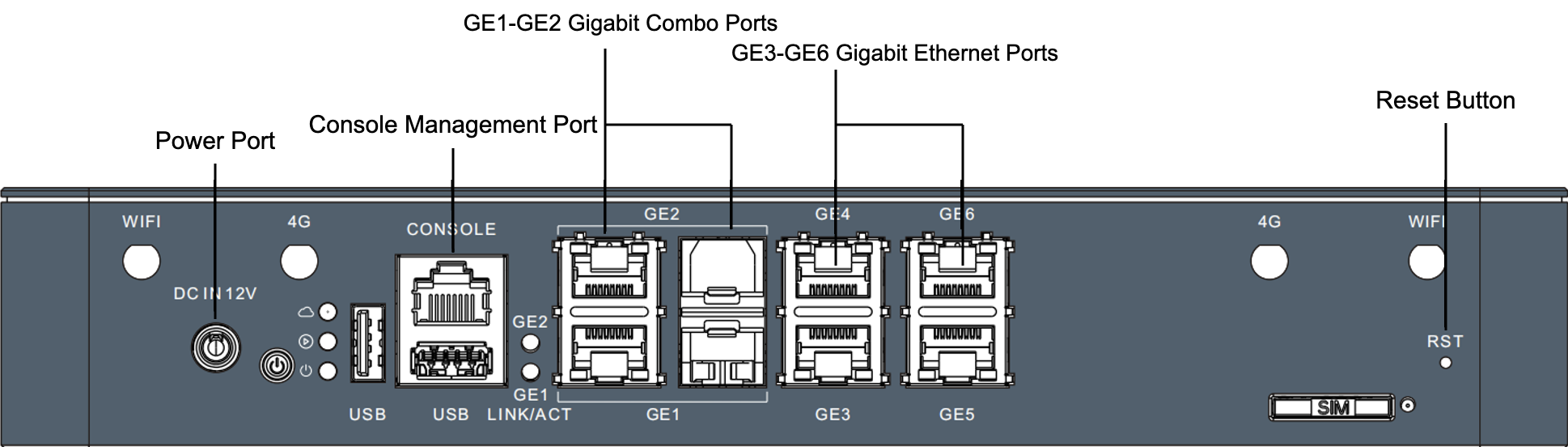
- GE1~GE2 Gigabit Combo ports, GE3~GE6 Gigabit electrical ports
- By default, GE1 and GE2 are WAN, and GE6 is the management port.
- Press and hold the reset button for 6 seconds and then release it to clear all configurations of the device.
5.5 NE206-M Rear Panel Description
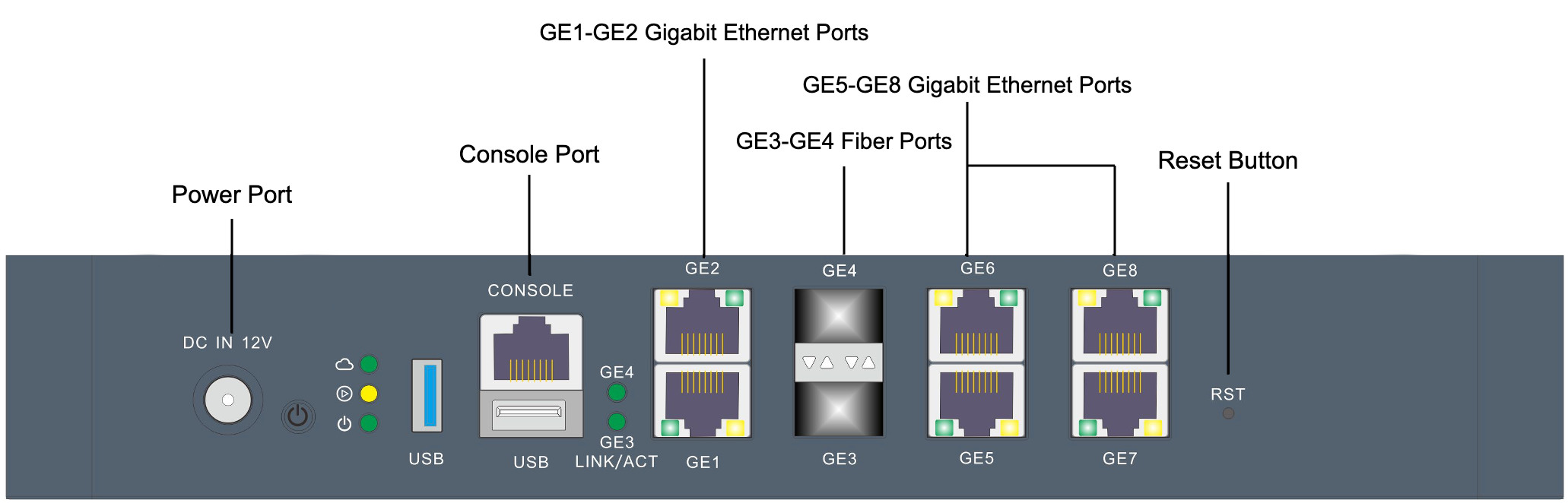
- GE1~GE2, GE5~GE8 Gigabit electrical ports, GE3~GE4 Gigabit optical ports
- By default, GE1 and GE2 are WAN, and GE6 is the management port.
- Press and hold the reset button for 6 seconds and then release it to clear all configurations of the device.
5.6 NE206WG/NE206WG-M Front Panel Description
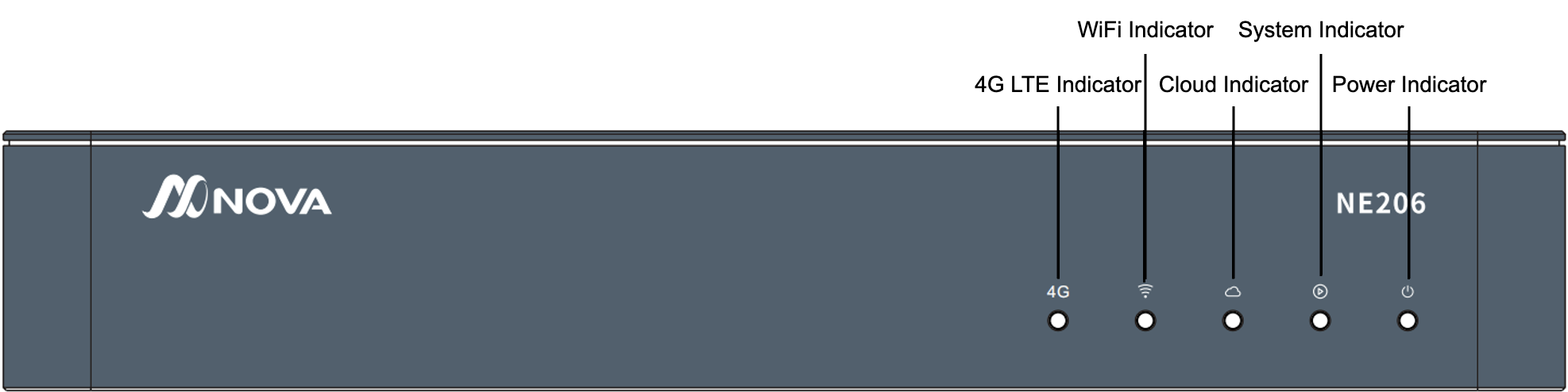
- Power indicator light: After the device is powered on, the power indicator light is always on
- System indicator light: After the system starts normally, the system indicator light is always on
- Cloud connection indicator: After the device is connected to the cloud controller normally, the cloud connection indicator is always on
- WiFi indicator light: When the light is on, it indicates that the device’s WiFi function is normal
- 4G LTE indicator light: When the light is on, it indicates that the device’s 4G LTE function is normal
5.7 NE206WG Rear Panel Description
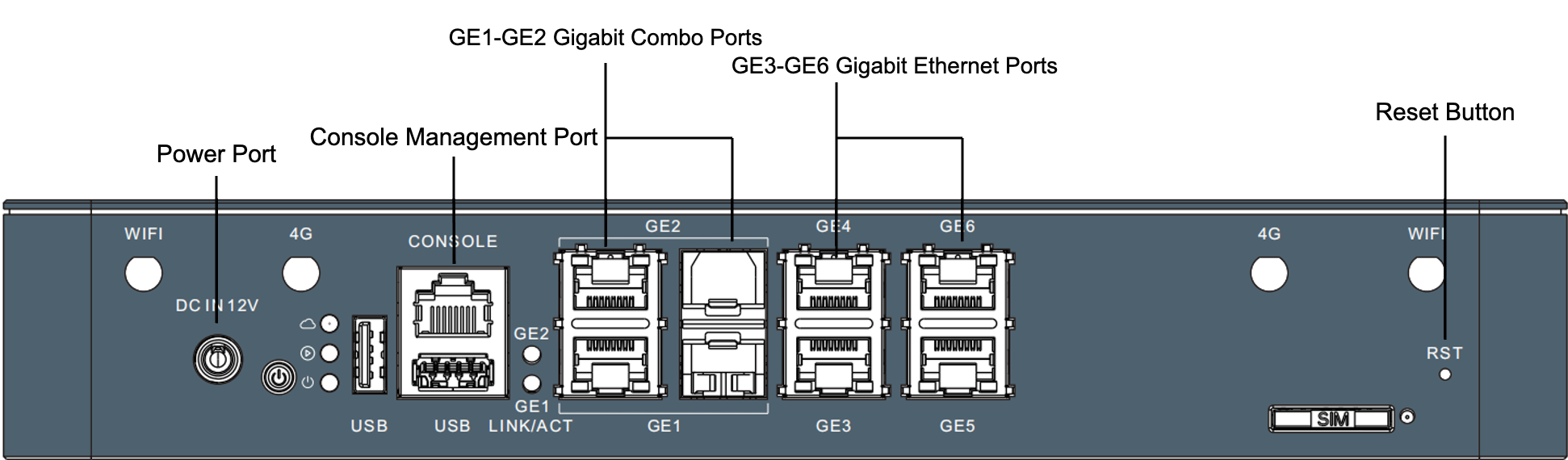
- GE1~GE2 Gigabit Combo ports, GE3~GE6 Gigabit electrical ports
- By default, GE1 and GE2 are WAN, and GE6 is the management port.
- Press and hold the reset button for 6 seconds and then release it to clear all configurations of the device.
5.8 NE206WG-M Rear Panel Description
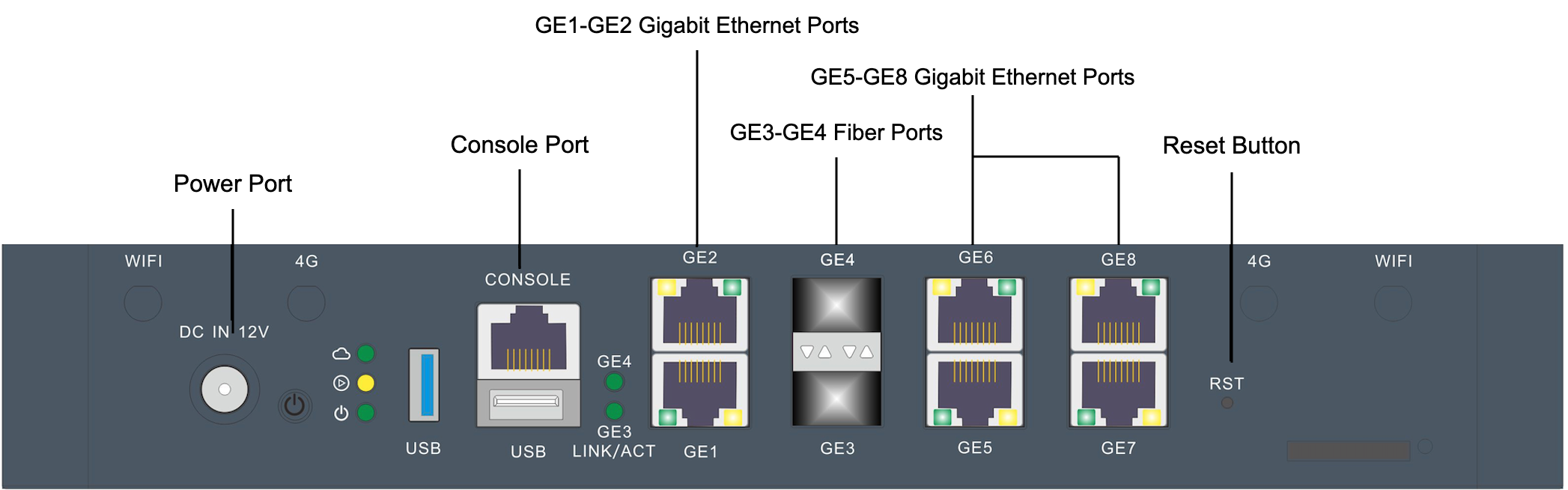
- GE1~GE2, GE5~GE8 Gigabit electrical ports, GE3~GE4 Gigabit optical ports
- By default, GE1 and GE2 are WAN, and GE6 is the management port.
- Press and hold the reset button for 6 seconds and then release it to clear all configurations of the device.
6 NE600 Series
6.1 Product Features
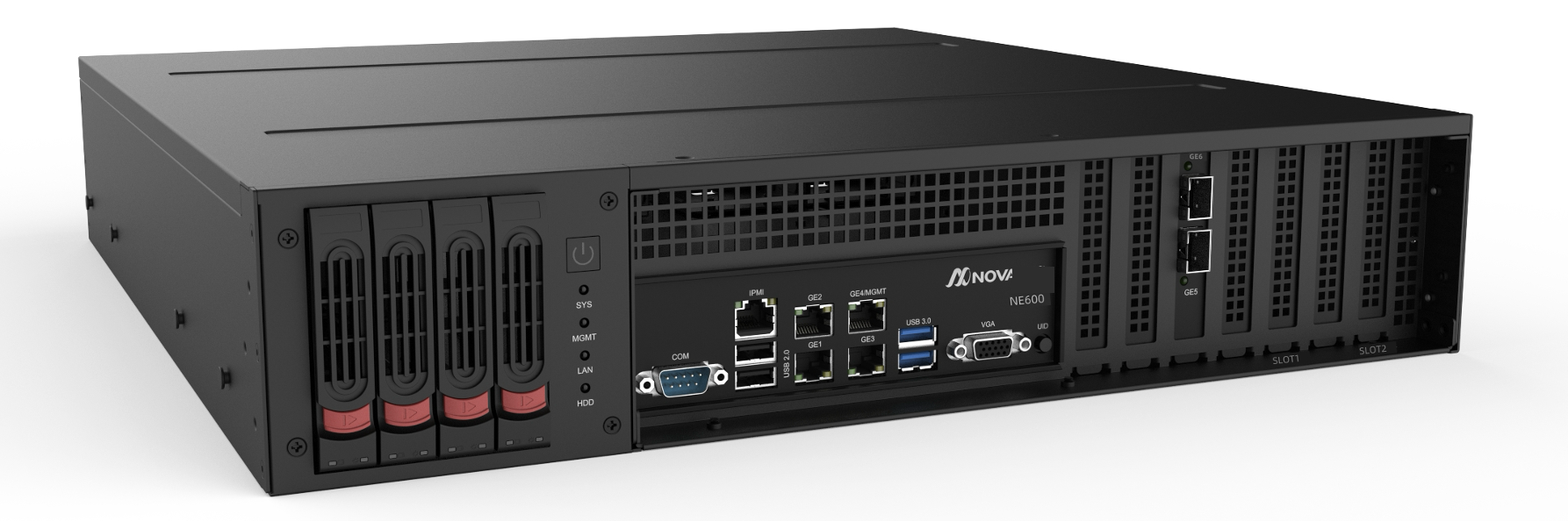
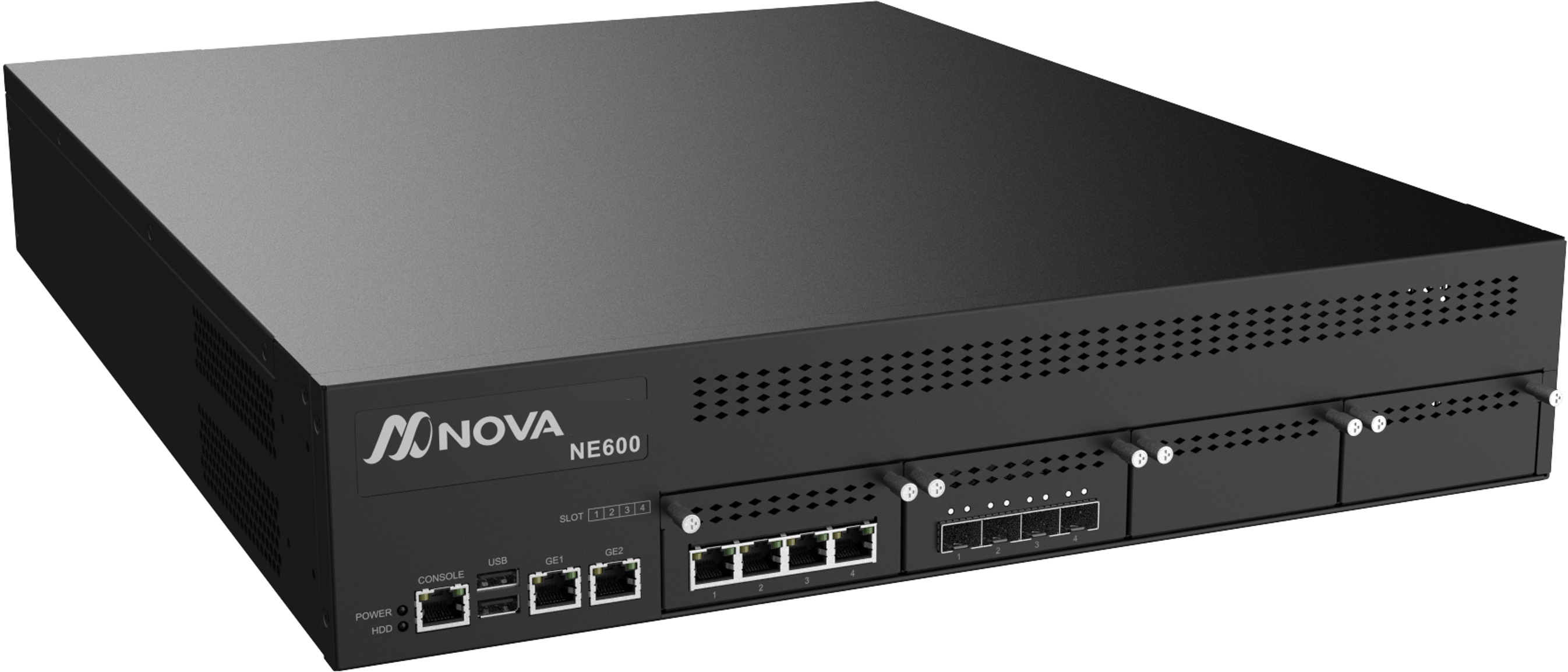
- Configure 4 GE network ports, 2 10GE optical ports, and 2 SLOT expansion slots
- Configure redundant power supplies to improve reliability
- 2U server architecture, standard shelf tray
- Passed Enhanced Network Security Firewall Certification
- Suitable for use as a Hub node
NE600-Z
NE600-MZ
6.2 Technical Indicators
| Project | NE600 | NE600-MZ | Notes |
|---|---|---|---|
| Hardware version | NE600-Z | NE600-MZ | |
| Underlay access performance | 10Gbps | 10Gbps | |
| Overlay single tunnel performance | 1.2Gbps | 3.2Gbps | |
| Overlay multi-tunnel performance | 7Gbps | 10Gbps | |
| Maximum number of tunnels | 2048 | 2048 | |
| Number of concurrent connections | 512K | 512K | |
| Maximum number of routes | 200K | 200K | |
| Maximum VRF number | 8 | 8 | |
| Number of ports | 4*GE network ports + 2*10GE optical ports (expandable) | 6*GE network ports + 4*10GE optical ports (expandable) | |
| Port hardware bypass | None | Expandable | |
| WAN+LAN | 2+4 | 2+4 | |
| USB port | 2*USB 3.0+2*USB 2.0 | 2*USB 3.0+2*USB 2.0 | |
| 4G/5G | None | None | |
| WIFI | None | None | |
| CPU | Intel X86 10 cores (20 threads) | Intel X86 12 cores | |
| Memory | 16GB DDR4 (expandable) | 16GB DDR4 (expandable) | |
| Storage | 480GB (expandable) | 128GB (expandable) | |
| Power supply | 100~240V AC, 1+1 redundant power supply | 100~240V AC, 1+1 redundant power supply | |
| Size (W*D*H) | 2U, 433x448.8x88mm | 2U, 560*440*88mm | |
| Application Scenario | Rack Mount | Rack Mount | |
| Operating temperature | 0~35℃ | 0~35℃ |
6.3 NE600 Panel Description
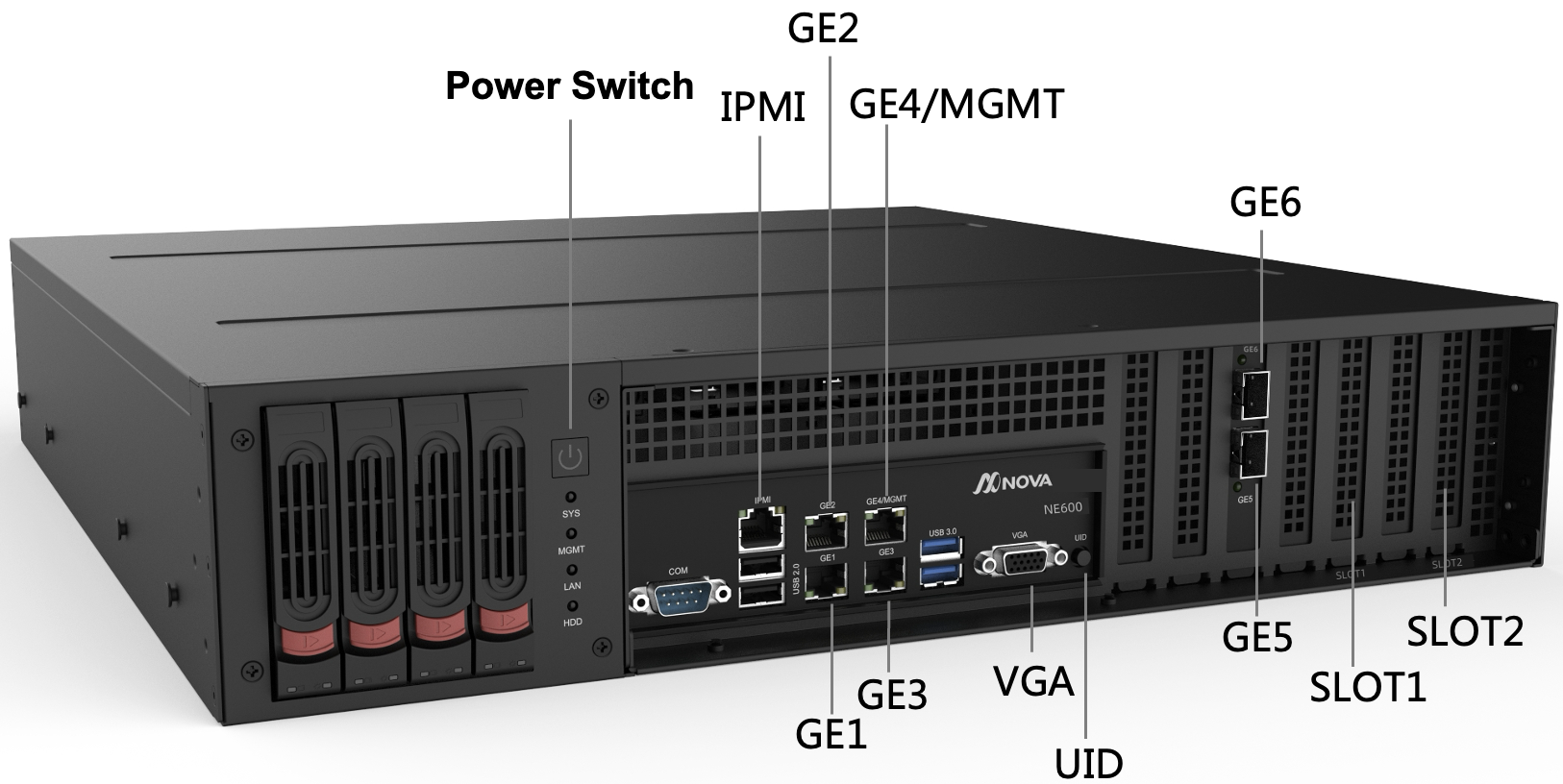
- GE1~GE4 Gigabit network ports, GE5~GE6 10G optical ports
- By default, GE1 and GE2 are WAN, and GE4 is the management port.
- SLOT1 and SLOT2 expandable network/encryption cards
- The UID light turns on when you press it once and turns off when you press it again. It can be used to mark the device.
Supported models
Network card model Specifications FM-NHI350AM4-T4 4-port Gigabit electrical port, PCI-E X4 FM-NHI350AM4-F4 4-port Gigabit optical port, PCI-E X4 FM-FTXL710BM1-F4 4-port 10G optical ports, PCI-E X8 FM-X710BM2-F2 2-port 10G optical port, PCI-E X8
6.4 NE600 Rear Panel Description
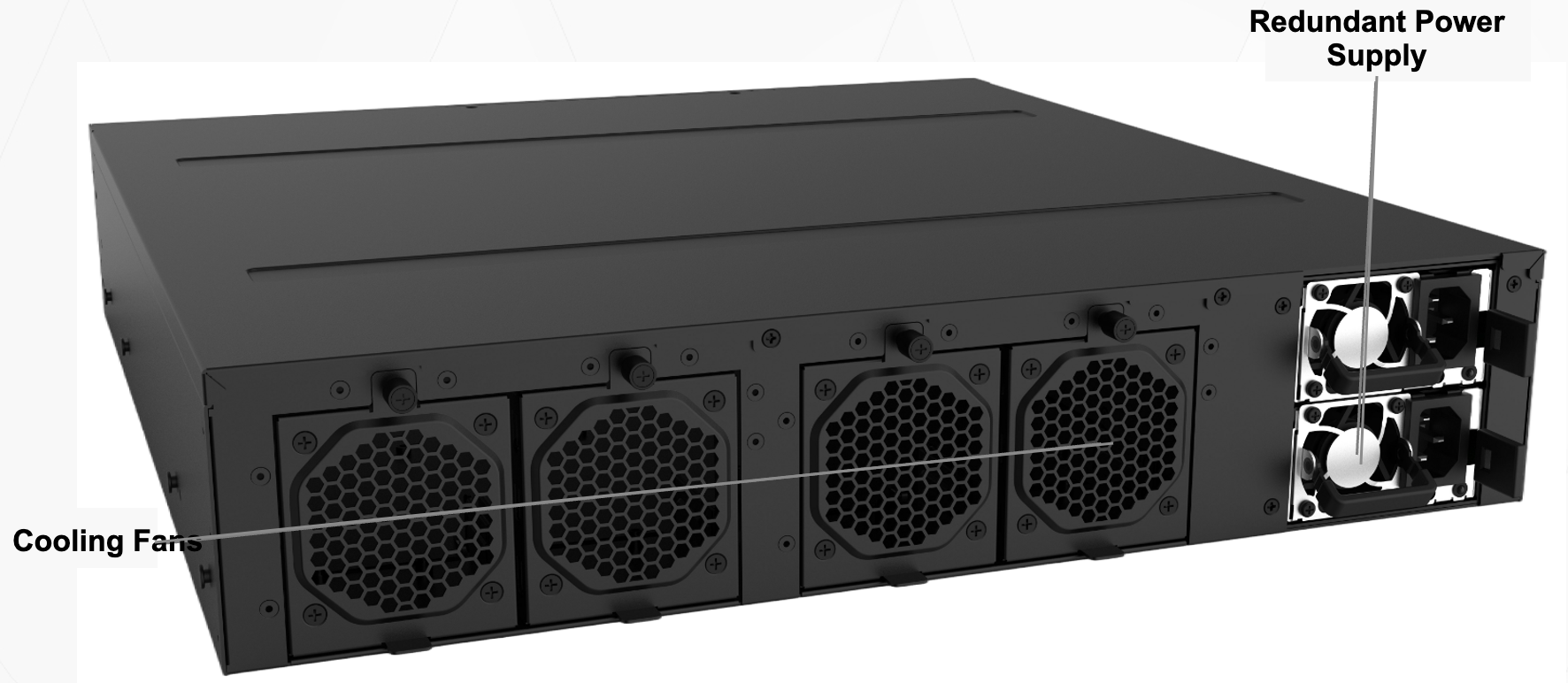
- Redundant power supplies
- Cooling fan
6.5 NE600-MZ Front Panel Description
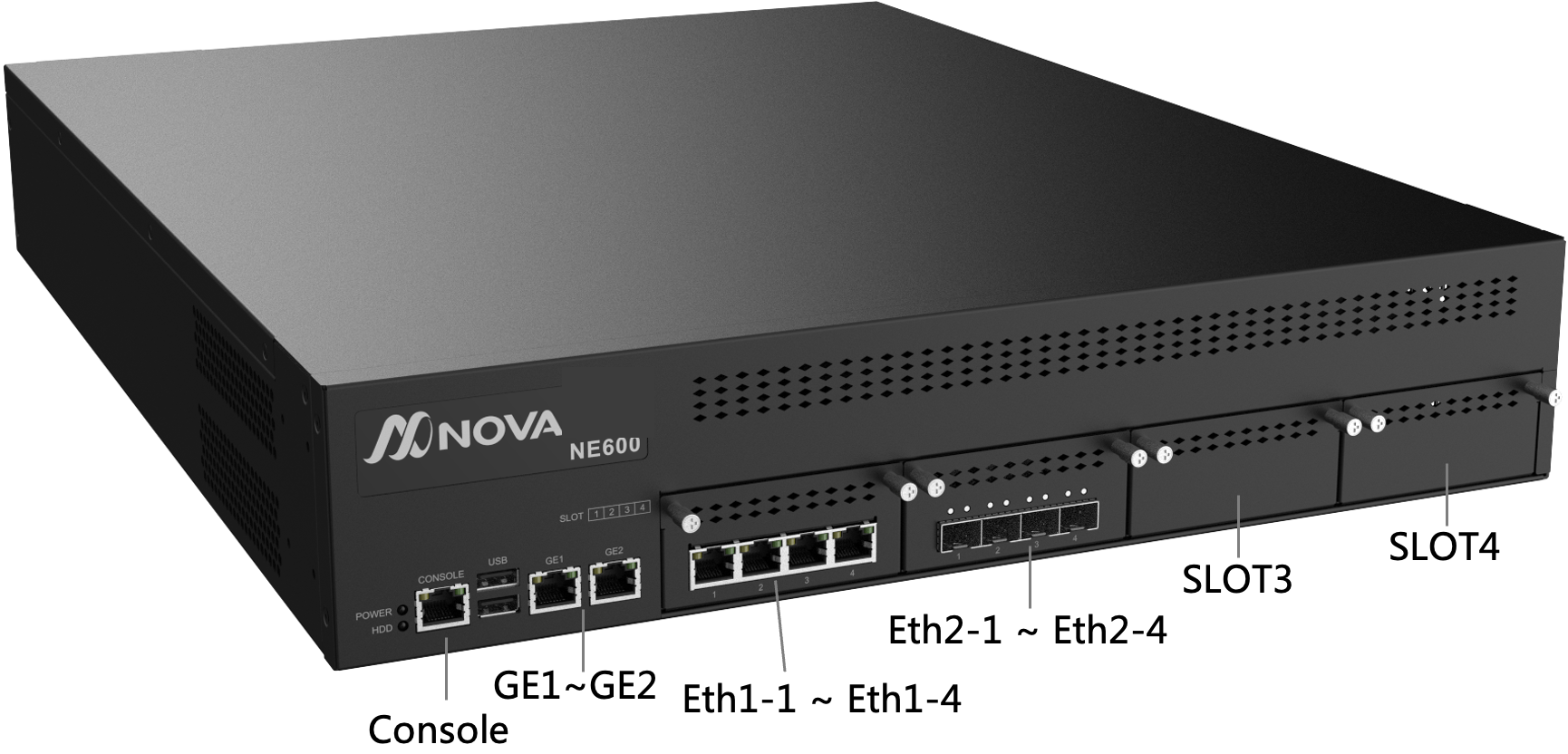
- GE1~GE2: Gigabit network port
- Eth1-1~Eth1-4: Gigabit electrical port
- Eth2-1~Eth2-4: 10G optical port
- By default, GE1 is WAN and GE2 is the management port.
- SLOT3 and SLOT4 slots: expansion network cards can be installed, and hardware bypass expansion network cards are available.
Supported models
Network card model Specifications NSM2-IGT406 ZWZN-ZX-4 electrical Gigabit expansion card 4 Gigabit electrical port NSM2-IGT406 ZWZN-ZX-4 electrical (2BP) Gigabit expansion card 4 Gigabit electrical port, with 2 sets of hardware bypasses NSM2-IXS401 4-optical 10G X710 40G optical port
6.5 NE600-MZ Rear Panel Description
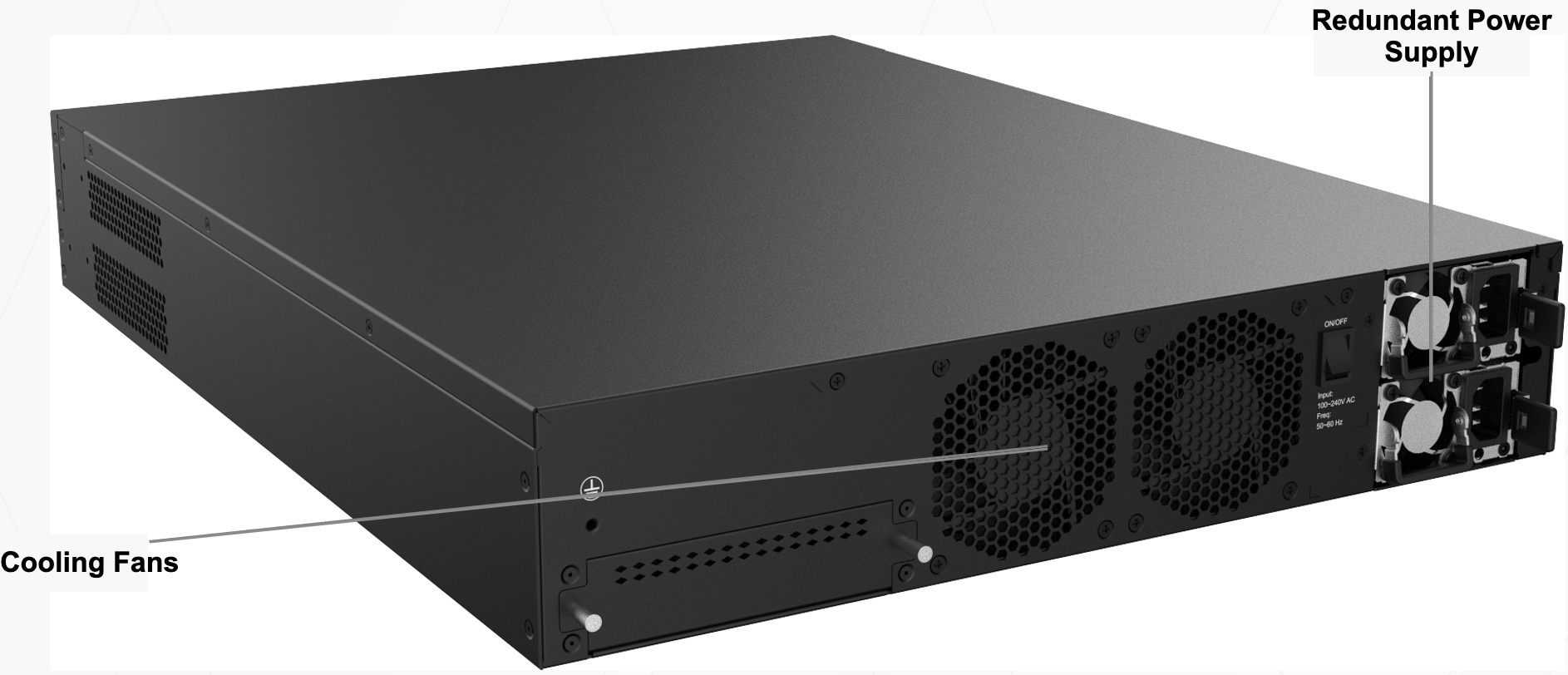
- Redundant power supplies
- Cooling fan
6.6 Supported Optical Modules
Single-Mode Module
| Model | Rate | Supported distance | Wavelength |
|---|---|---|---|
| SFP-10G-LR | 10Gbps | 10km | 1310nm |
| SFP-LX | 1Gbps | 20km | 1310nm |
Multimode Module
| Model | Rate | Supported distance | Wavelength |
|---|---|---|---|
| SFP-10G-SR | 10Gbps | 300m | 850nm |
Optical-to-Electrical Module
| Model | Rate |
|---|---|
| SFP-TX | 1Gbps |
7 NE800 Series
7.1 Product Features
- Configure 4 GE network ports, 2 10GE optical ports, and 2 SLOT expansion slots
- Configure dual-channel processor and storage redundancy and power supply redundancy to ensure higher reliability
- 2U server architecture, standard shelf tray
- Suitable for use as a Hub node
7.2 Technical Indicators
| Project | Specifications | Notes |
|---|---|---|
| Product model | NE800 | |
| Hardware version | NE800-Z | |
| Underlay access performance | 10Gbps | |
| Overlay single tunnel performance | 1.8Gbps | |
| Maximum number of tunnels | 2048 | |
| Number of concurrent connections | 1024K | |
| Maximum number of routes | 200K | |
| Maximum VRF number | 8 | |
| Number of ports | 4*GE network ports + 2*10GE optical ports (expandable) | |
| WAN+LAN | 2+4 | |
| USB port | 2*USB 3.0+2*USB 2.0 | |
| 4G/5G | None | |
| WIFI | None | |
| CPU | Intel X86 12 cores*2 (24 threads*2) | |
| Memory | 16GB*2 DDR4 (expandable) | |
| Storage | 480GB*2 (expandable) | |
| Power supply | 100~240V AC, 1+1 redundant power supply | |
| Dimensions (W*D*H) | 2U, 433x448.8x88mm | |
| Application scenarios | Rack-mounted | |
| Operating temperature | 0~35℃ |
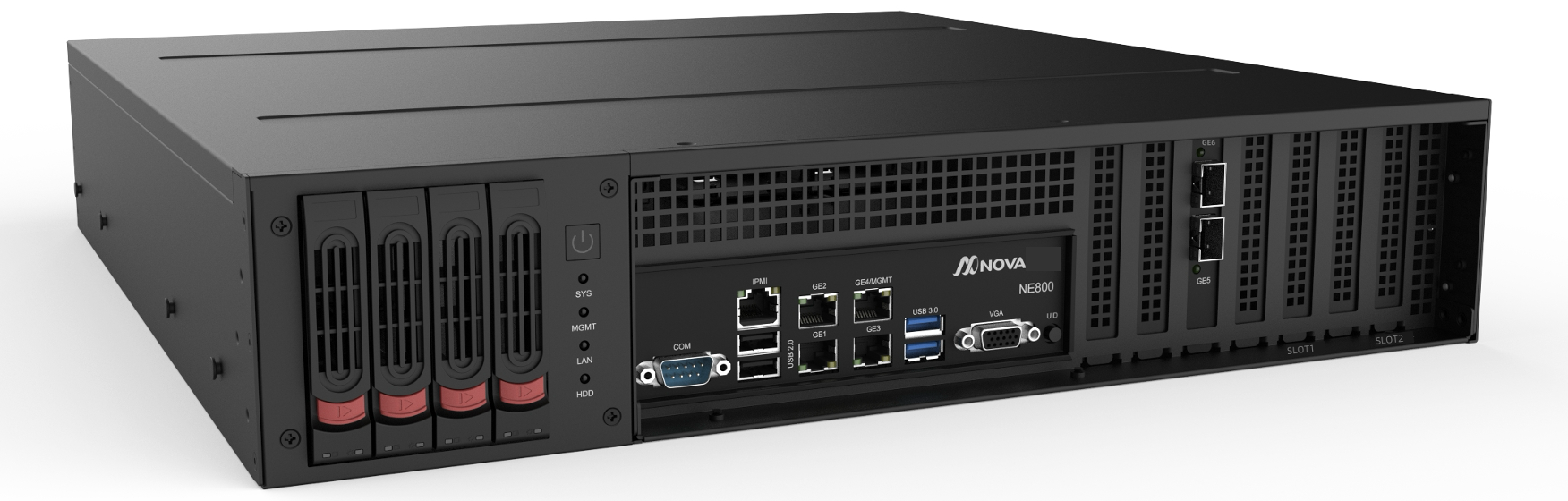
7.3 I/O Front Panel Description
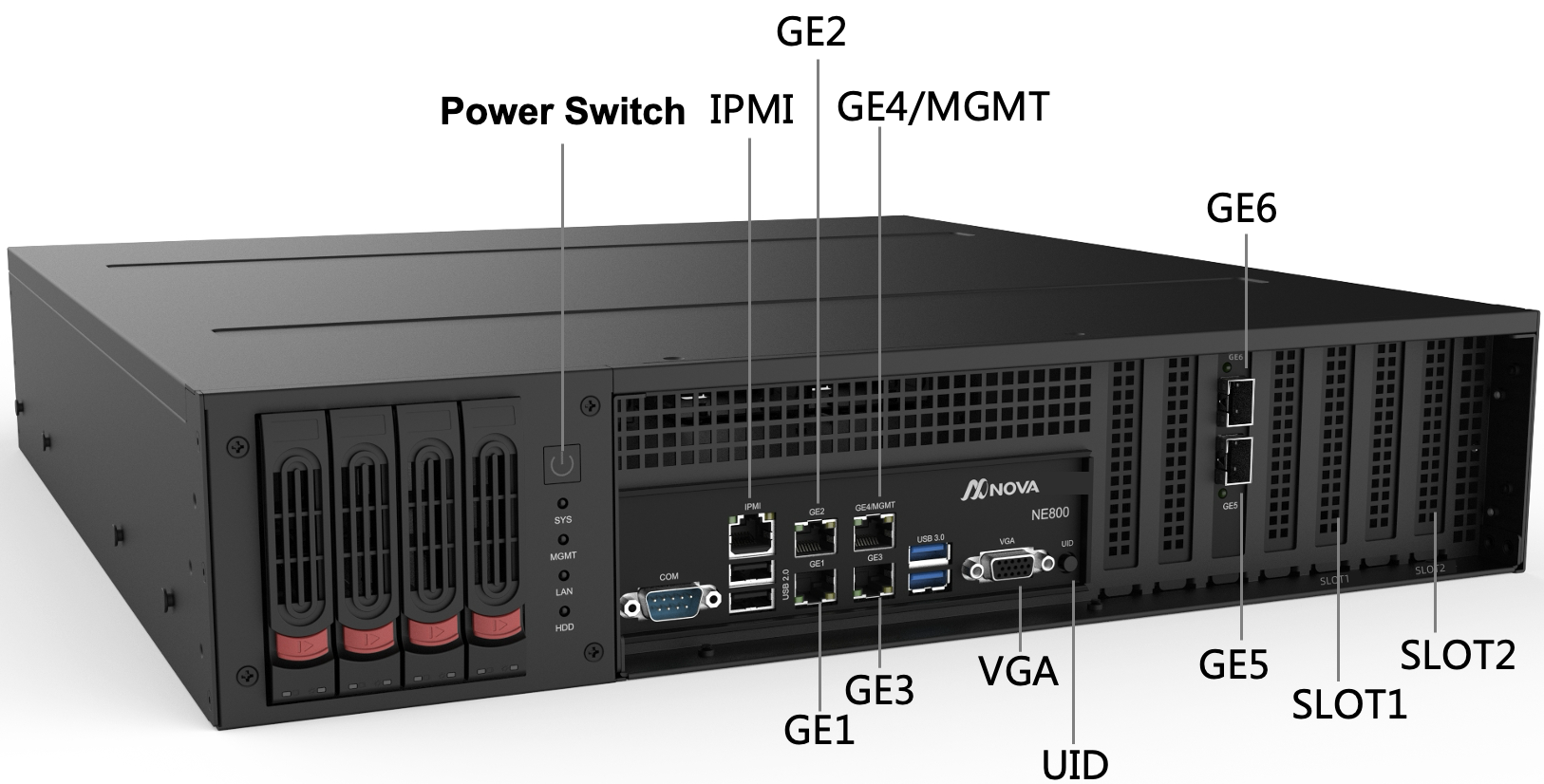
- GE1~GE4 Gigabit network ports, GE5~GE6 10G optical ports
- By default, GE1 and GE2 are WAN, and GE4 is the management port.
- SLOT1 and SLOT2 expandable network/encryption cards
- The UID light turns on when you press it once and turns off when you press it again. It can be used to mark the device.
Supported models
Network card model Specifications FM-NHI350AM4-T4 4-port Gigabit electrical port, PCI-E X4 FM-NHI350AM4-F4 4-port Gigabit optical port, PCI-E X4 FM-FTXL710BM1-F4 4-port 10G optical ports, PCI-E X8 FM-X710BM2-F2 2-port 10G optical port, PCI-E X8
7.4 I/O Rear Panel Description
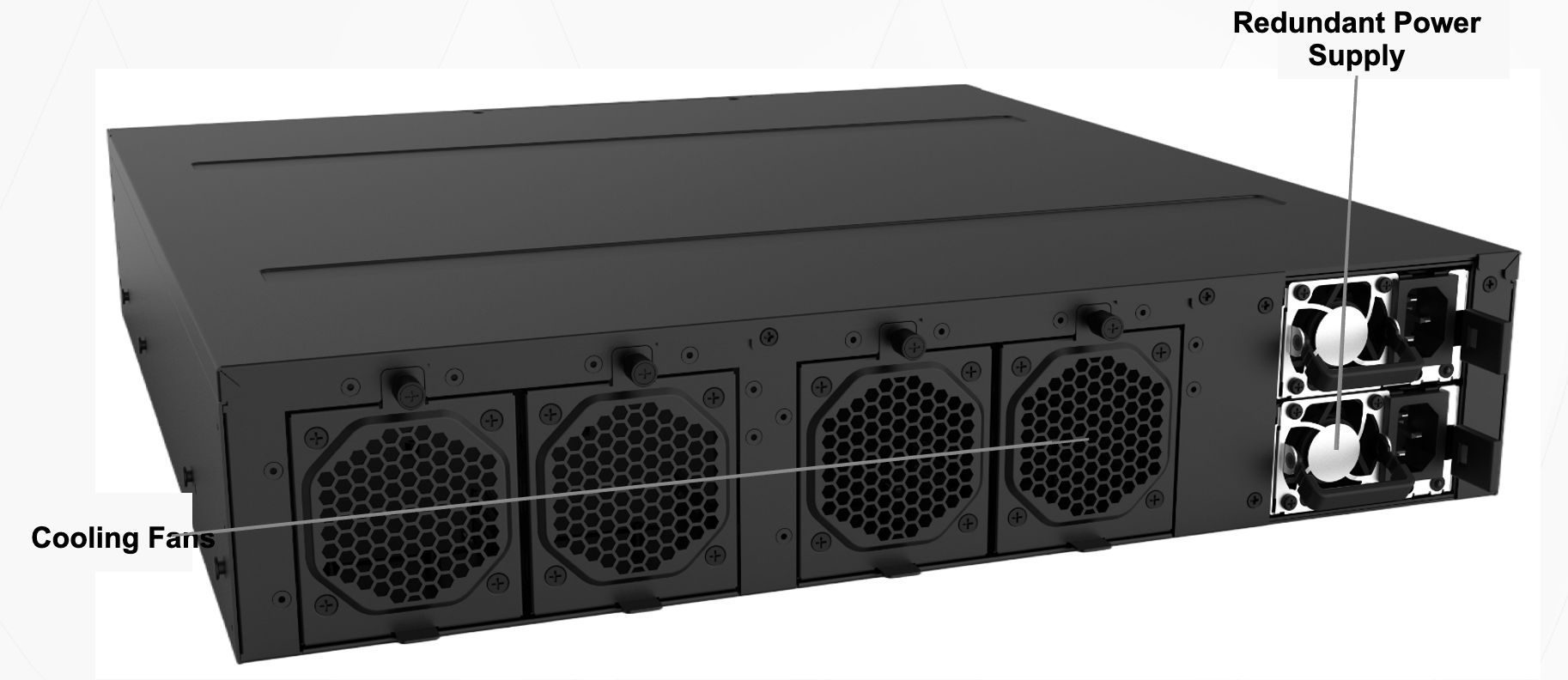
- Redundant power supplies
- Cooling fan
7.5 Supported Optical Modules
Single-Mode Module
| Model | Rate | Supported distance | Wavelength |
|---|---|---|---|
| SFP-10G-LR | 10Gbps | 10km | 1310nm |
| SFP-LX | 1Gbps | 20km | 1310nm |
Multimode Module
| Model | Rate | Supported distance | Wavelength |
|---|---|---|---|
| SFP-10G-SR | 10Gbps | 300m | 850nm |
Optical-to-Electrical Module
| Model | Rate |
|---|---|
| SFP-TX | 1Gbps |
8 NE900 Series
NE900 uses a customized Linux operating system, mainly used for deployment in virtualization platforms
8.1 Product Features
- Supports mainstream public cloud platforms such as AWS, Azure, GCP, Alibaba Cloud, Baidu Cloud, Tencent Cloud, Huawei Cloud, etc.
- Supports VMware and KVM private cloud platforms
- Supports HA high availability deployment (supported by some cloud platforms)
- Supports customizing the number of WAN/LAN ports
- Supports security features (AWS requires version 6.4.0 or above)
8.2 Resource Requirements
| Applicable scenarios | Normal performance | Standard performance | High performance |
|---|---|---|---|
| vCPU | 2 cores | 4 cores | 8 cores |
| Memory | 4GB | 8GB | 16GB |
| Storage | 32GB | 32GB | 64GB |
| Security Features | Not supported | Supported | Supported |
8.3 Technical Indicators
| Metrics | 2 cores/4GB/32GB | 4 cores/8GB/32GB | 8 cores/16GB/64GB |
|---|---|---|---|
| IPsec Tunnel Performance | 250Mbps | 500Mbps | 1.8Gbps |
| IPsec tunnel performance (security function enabled) | - | 250Mbps | 900Mbps |
| Maximum number of tunnels | 256 | 512 | 2048 |
| Number of concurrent connections | 128k | 256k | 512k |
| Maximum number of routes | 50k | 100k | 200k |
| Maximum number of VRFs | 2 | 4 | 8 |
Performance data based on VMware ESXi version 7.0, Intel(R) Xeon(R) Silver 4208 CPU @ 2.10GHz
- CPU settings:
- Power savings disabled
- Hyper-threading disabled
- Minimum instruction sets SSE3, SSE4, and RDTSC instructions
- Recommended instruction sets AVX2 or AVX512
- VMware ESXi settings:
- CPU shares - High
- Memory reservation - Maximum