Acceleration gateway supports multiple exits
Core features
- Highly available (HA) architecture
The multi-exit acceleration gateway adopts an active-standby high-availability deployment model and achieves unified management and collaborative work through high-availability gateway groups. When a single gateway instance fails, the HA mechanism can automatically complete fast switching to ensure tenant business continuity and overall service availability. At the egress level, the multi-exit acceleration gateway supports users to manually specify the primary and secondary egresses, and also supports real-time monitoring of the egress status based on the WAN detection configured in the high-availability gateway group, thereby automatically completing the switching of the primary and secondary egresses when an abnormality is detected.
- Multiple WAN export capabilities
A single multi-exit acceleration gateway node can access multiple WAN interfaces at the same time to meet cross-regional access and scheduling requirements. Tenants only need to purchase a share of the total bandwidth (for example, 50 Mbps), which can be shared among multiple egresses on demand, rather than purchasing independent bandwidth for each egress. This model effectively improves bandwidth utilization while meeting the needs of multi-exit access.
- Exit-aware SNAT policy linkage capability
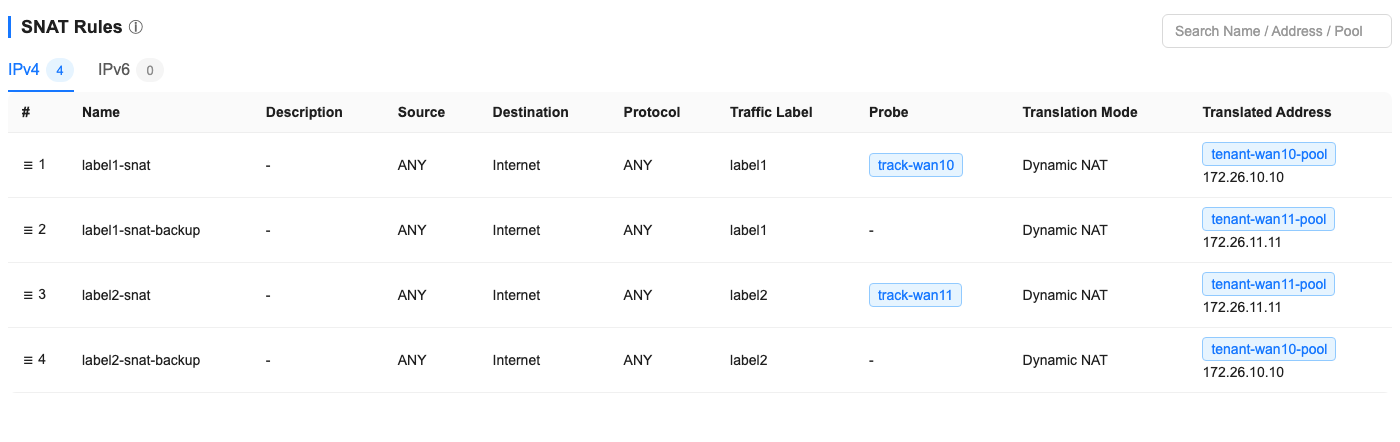
The SNAT policy of the multi-exit acceleration gateway can be linked to the detection status associated with the gateway group. When the detection result is normal, the SNAT policy takes effect and carries the corresponding egress traffic; if the associated egress detection fails, the corresponding SNAT policy automatically becomes invalid, and the traffic will continue to match subsequent available rules in policy order, thereby achieving automatic obstacle avoidance and business continuity guarantee at the egress level.
Scene
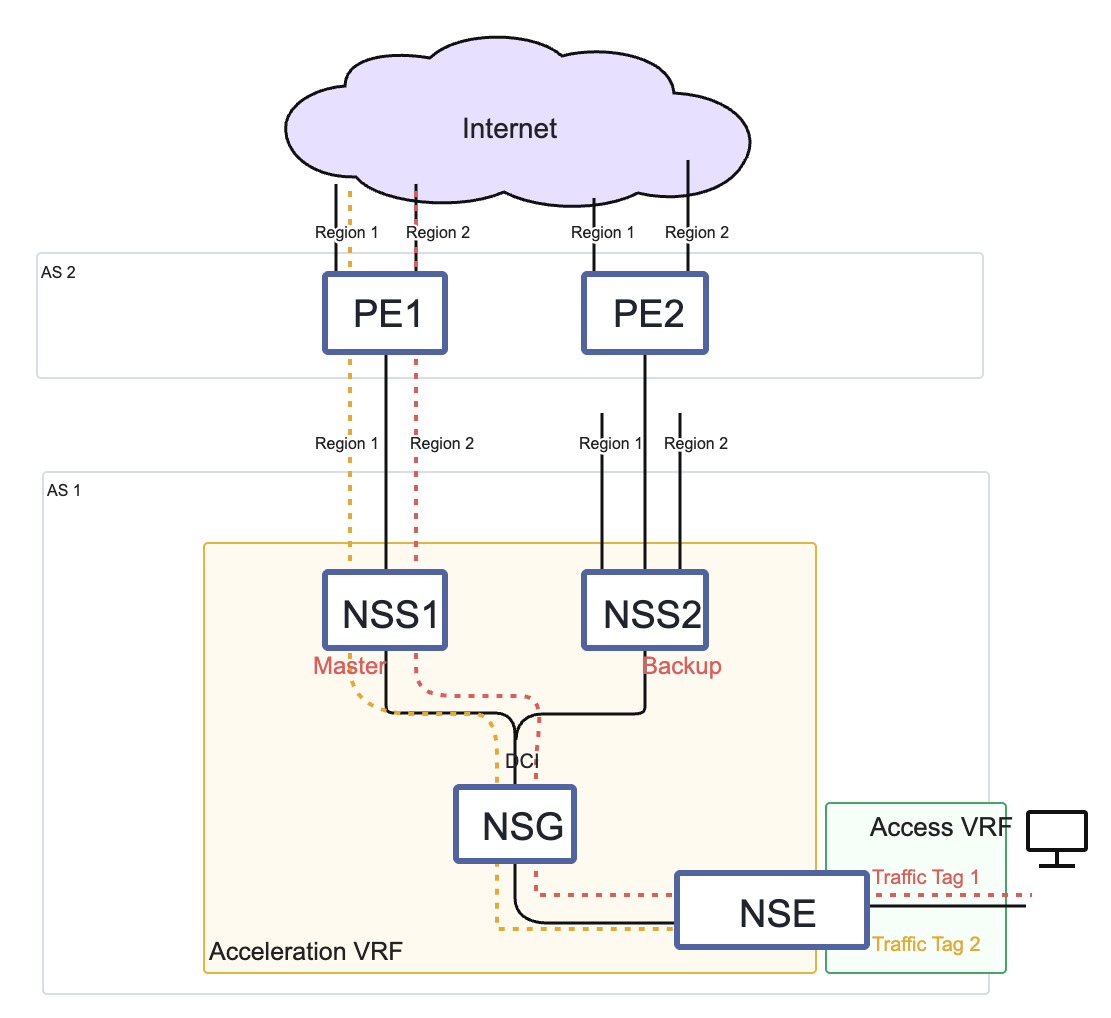
Gateway configuration
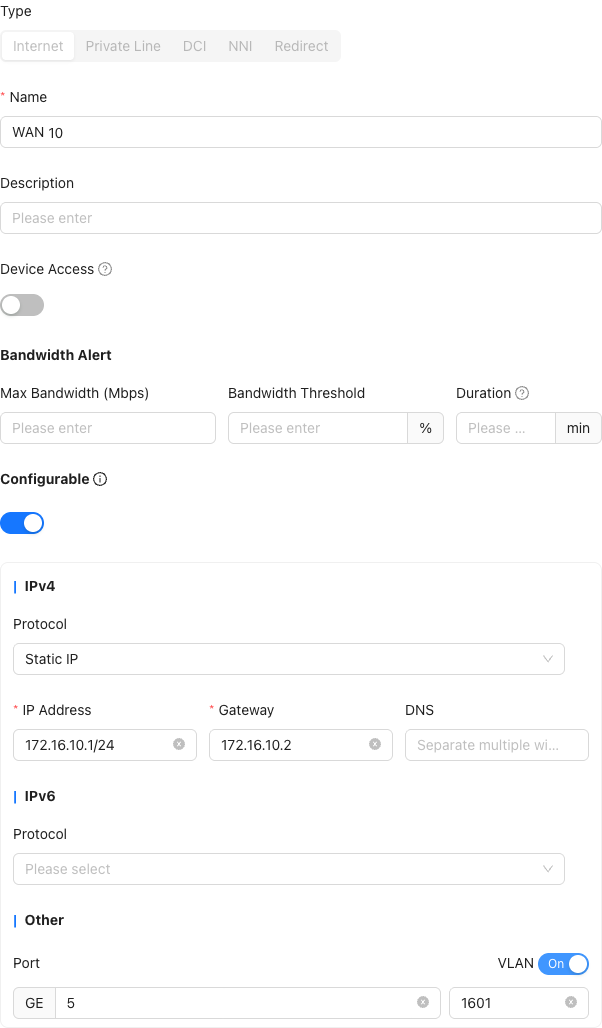
1. Gateway WAN sub-interface
"Provider"→"Resource"→"Gateways"→"Edit Gateway"→"General"→"WAN"→"New"→"Internet"→"Create Port"
- Physical ports require explicit configuration
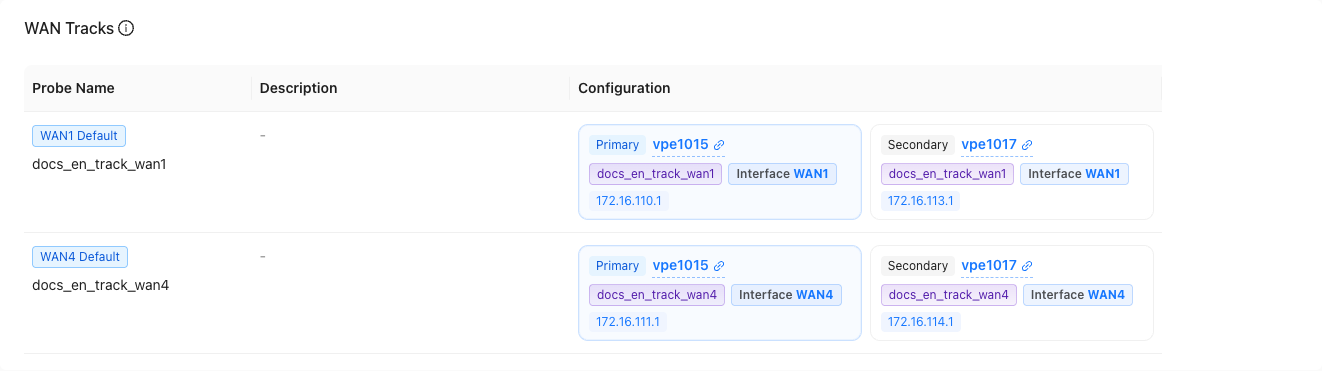
2. Gateway WAN detection
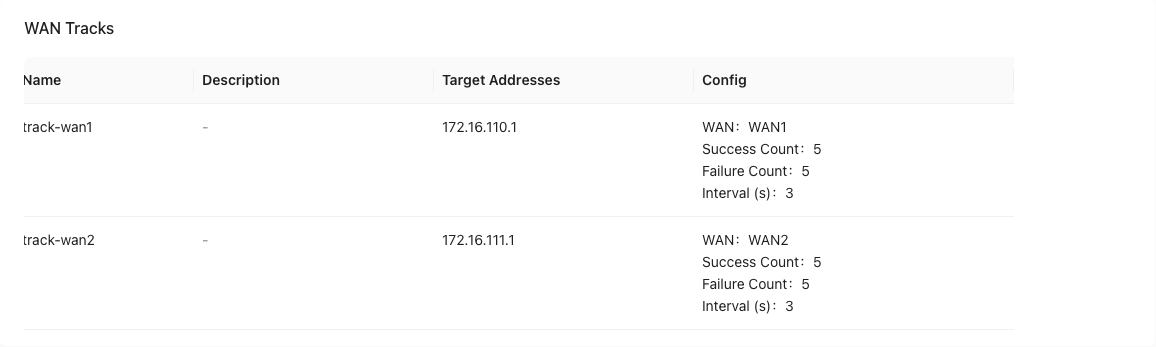
"Provider"→"Resource"→"Gateways"→"Edit Gateway"→"Advanced"→"WAN Tracks"→"New"
- It is recommended to detect PE VIP
3. Gateway high availability group WAN detection
"Provider"→"Resource"→"Gateways"→"HA Gateway Pair"→"Edit HA Gateway Pair"→"WAN Tracks"→"New"
- Both the active and standby gateways need to have WAN detection configuration
- Default tags are not editable
- Detections can be modified but cannot be reused
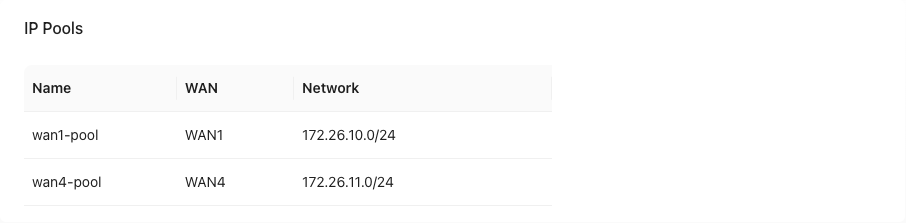
4. Gateway WAN address pool
"Provider"→"Resource"→"Gateways"→"HA Gateway Pair"→"Edit HA Gateway Pair"→"IP Pools"→"New"
- Pre-enter the address segment in the gateway and bind several IP addresses to the acceleration VRF in the tenant
Tenant configuration
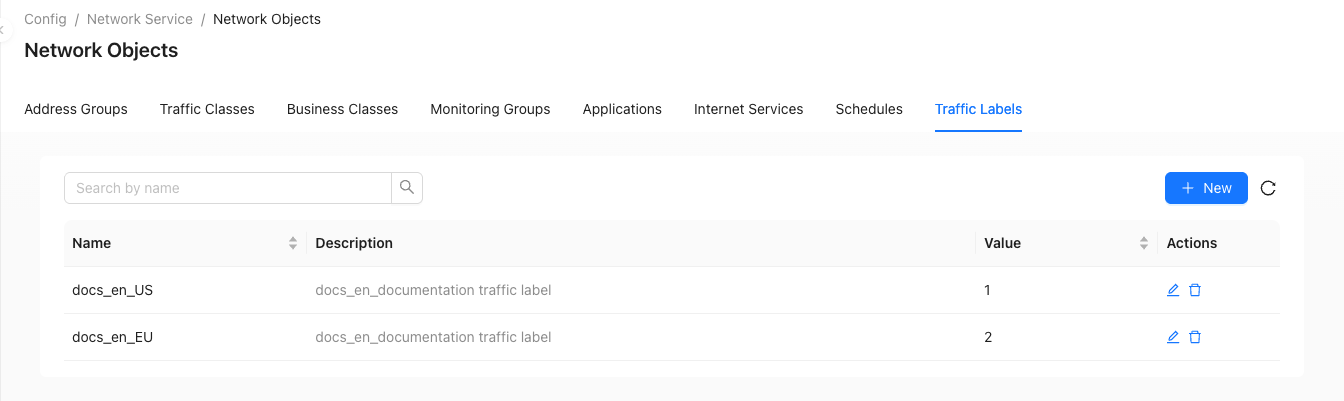
5. Traffic tags
"Tenant"→"Config"→"Network Service"→"Network Objects"→"Traffic Labels"→"New"
6. Address Group
"Tenant"→"Config"→"Network Service"→"Network Objects"→"Address Groups"→"New"

Tenant site access VRF
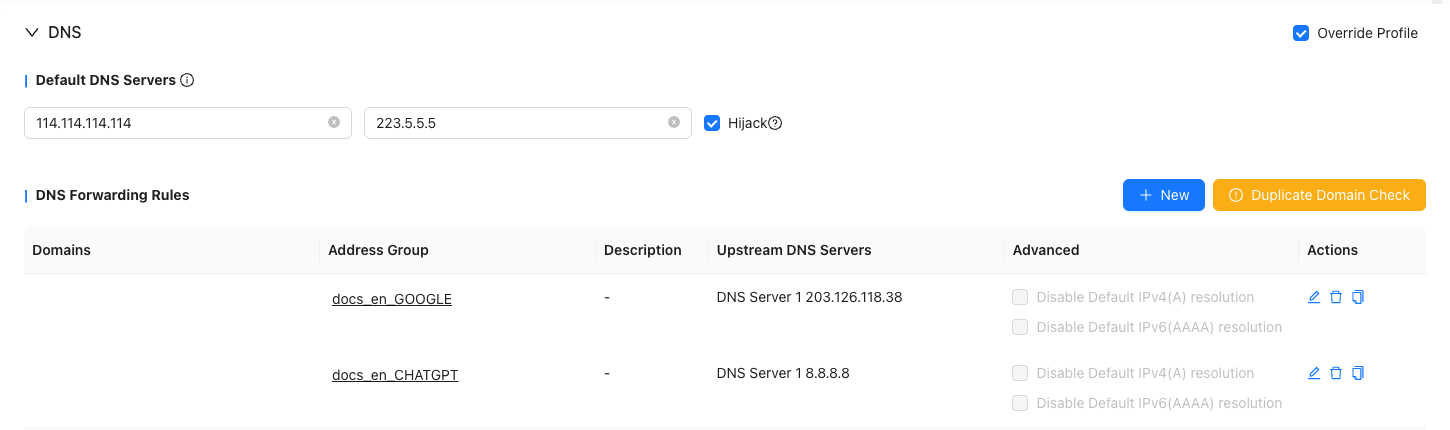
7. Site DNS
"Tenant"→"Config"→"Sites"→"Edit Site"→"VRF Configuration"→"DNS"
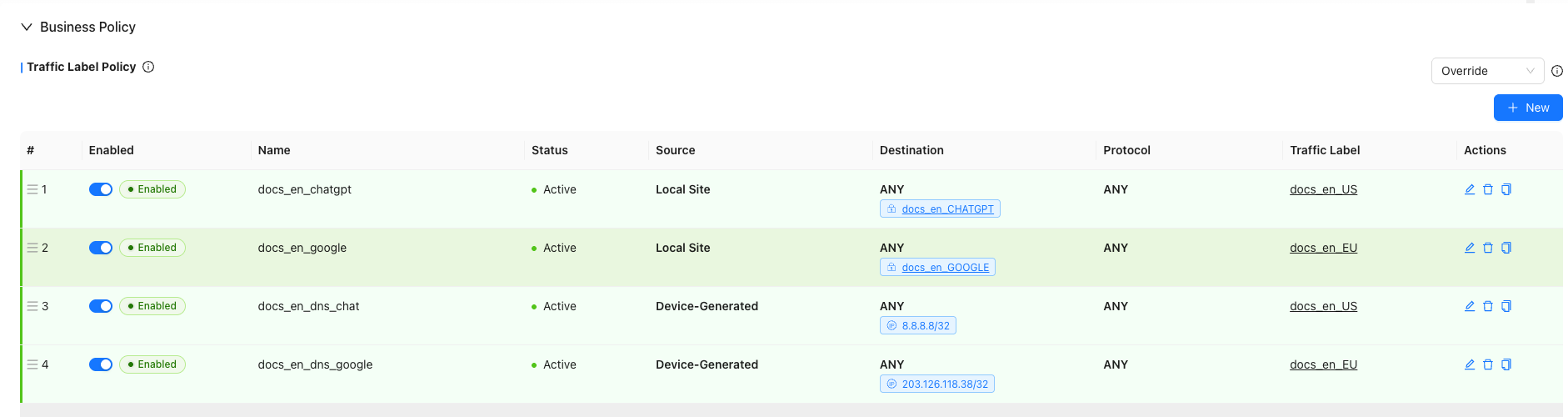
8. Traffic label strategy
"Tenant"→"Config"→"Sites"→"Edit Site"→"VRF Configuration"→"Business Policy"→"Traffic Label Policy"→"New"
- This site: refers to the LAN side of this device, that is, the network and terminal belonging to the trust zone
- This device: refers to the device itself, including the system processes, control plane and traffic initiated by the device
9. VRF routing
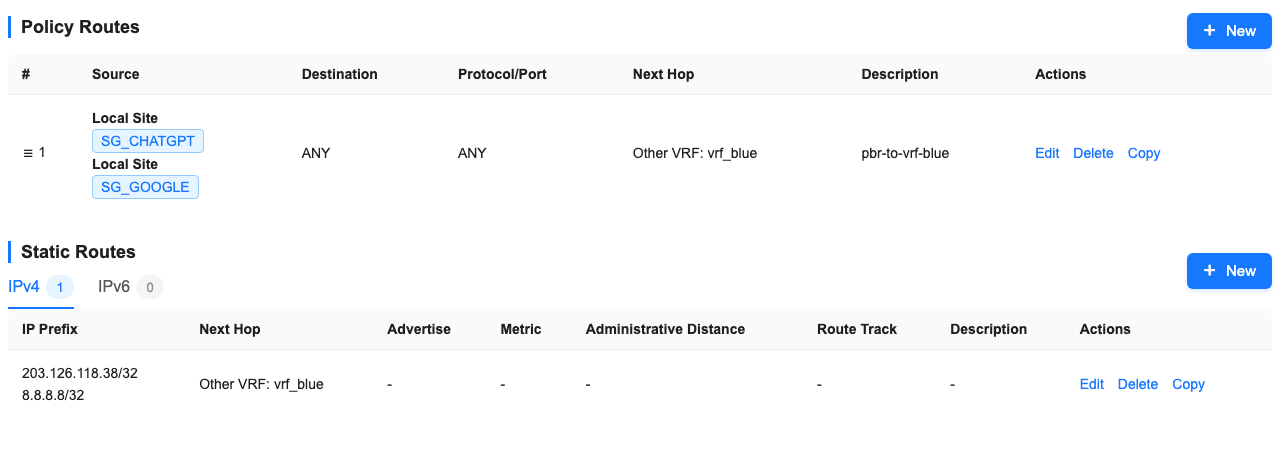
"Tenant"→"Config"→"Sites"→"Edit Site"→"VRF Configuration"→"Policy Routes"
"Tenant"→"Config"→"Sites"→"Edit Site"→"VRF Configuration"→"Static Routes"
- Static routes do not need to be published
Tenant site acceleration VRF
10. Static routing
"Tenant"→"Config"→"Sites"→"Edit Site"→"VRF Configuration"→"Static Routes"
- In the accelerated VRF, the lan prefix of the access VRF is pointed back to the access vrf through static routing.

11. Traffic labeling strategy
"Tenant"→"Config"→"Sites"→"Edit Site"→"VRF Configuration"→"Business Policy"→"Traffic Label Policy"→"New"
- In accelerated VRF, you need to configure the traffic label source label policy to ensure that labels will not be cleared (the system will clear labels from other VRF traffic by default)

12. NAT
"Tenant"→"Config"→"Sites"→"Edit Site"→"VRF Configuration"→"NAT"→"SNAT Rules"
- Configure snat policy, convert the source address to device management IP, and configure TCP and UDP at the same time

13. Firewall
"Tenant"→"Config"→"Sites"→"Edit Site"→"VRF Configuration"→"Firewall"→"ACL Firewall"
- Allow traffic from default vrf

14. Network Service Nova Gateway
"Tenant"→"Config"→"Network Service"→"Nova Gateways"→"HA Gateway Pair Configuration"→"New"
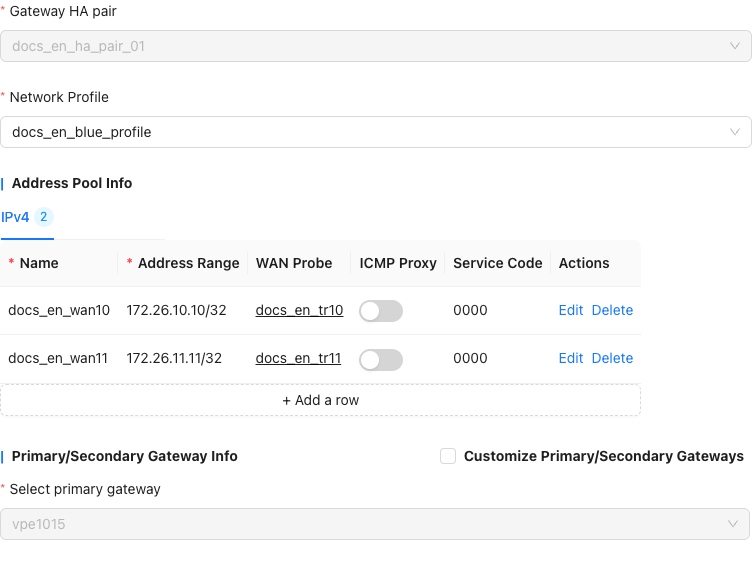
"Tenant"→"Config"→"Network Service"→"Nova Gateways"→"HA Gateway Pair Configuration"→"Edit Nova Gateway Group Config"


- For snat policies with detection, the corresponding minimum policy must be configured at the same time